
What this guide answers
- Do volunteers have to finish the whole tutorial?
No. The ten-chapter tutorial is optional and made for people who want the full map.
- Can a volunteer turn the tour offers off?
Yes. " offers.
- Can other people see how far a volunteer has got?
A person's progress is their own. Other people at the club can't see it, and the platform's statistics show overall figures only, not what a particular person has learnt.
- What if the software changes?
The tours live in the product and are updated with it, so you aren't maintaining screenshots.
South Africa edition. This guide is written for volunteer-run clubs in South Africa. Where rules differ — grants, tax, incorporation, safeguarding — follow the South Africa-specific pointers below or check with your national body.
Most clubs have been here. Somebody spends a weekend writing a twenty-page "how to use the system" document with screenshots. It is accurate on the day. Three months later the software has changed, the screenshots are out of date, and the only people who ever opened it are the author and the person who asked for it.
Volunteers don't skip training because they're lazy. They skip it because they give the club a few hours a week and want to spend them on the job. A manual asks for an hour of reading before any of the actual work begins.
This guide covers a different approach: train people on the screens, while they're looking at them. We'll compare the main options, lay out a practical session plan, and say plainly where in-app tours fall short. For the wider picture of getting volunteers started, see club volunteer induction and training.
Why manuals and videos lose
Each common format has a reasonable case and a recurring weakness.
The PDF manual. It's thorough and easy to produce. It also goes stale the moment the software changes, it's separate from the screen where the work happens, and nobody searches a long document at the moment they're stuck. Volunteers ask the nearest human instead, and that human is usually already overloaded.
The video library. Videos show motion, which helps. They're also slow to scan, hard to update (one changed button can mean a re-record), and easy to watch passively without taking anything in. A volunteer who has watched fifteen minutes of video still has to find the button alone later.
The one-off demo. A live walk-through from a committee member is warm and answers questions. It only works for the people in the room, it can't be replayed, and the person doing it is usually the busiest one.
Learning by doing, unguided. Plenty of volunteers just click around. It's fast, and it works for confident people, but it leaves gaps. They learn the three buttons they stumbled on and never find the fourth that would have saved them an hour.
None of these is wrong. The question is which job each format suits. Rules belong in documents, and demonstrations of judgement belong with people. Where a button is, what a page is for, and what to look at first is the job of the software itself.
What in-app guided tours do well
A guided tour is a short sequence of highlighted spots on the page you're actually looking at. In ClubHelix, every admin page has one. You open the page and press Tour this page, beside the ? help button. The page dims, a spotlight lands on one control, and a short note says what it's for. Next and Back (or the arrow keys) move through it, Esc closes it, and Finish completes it.
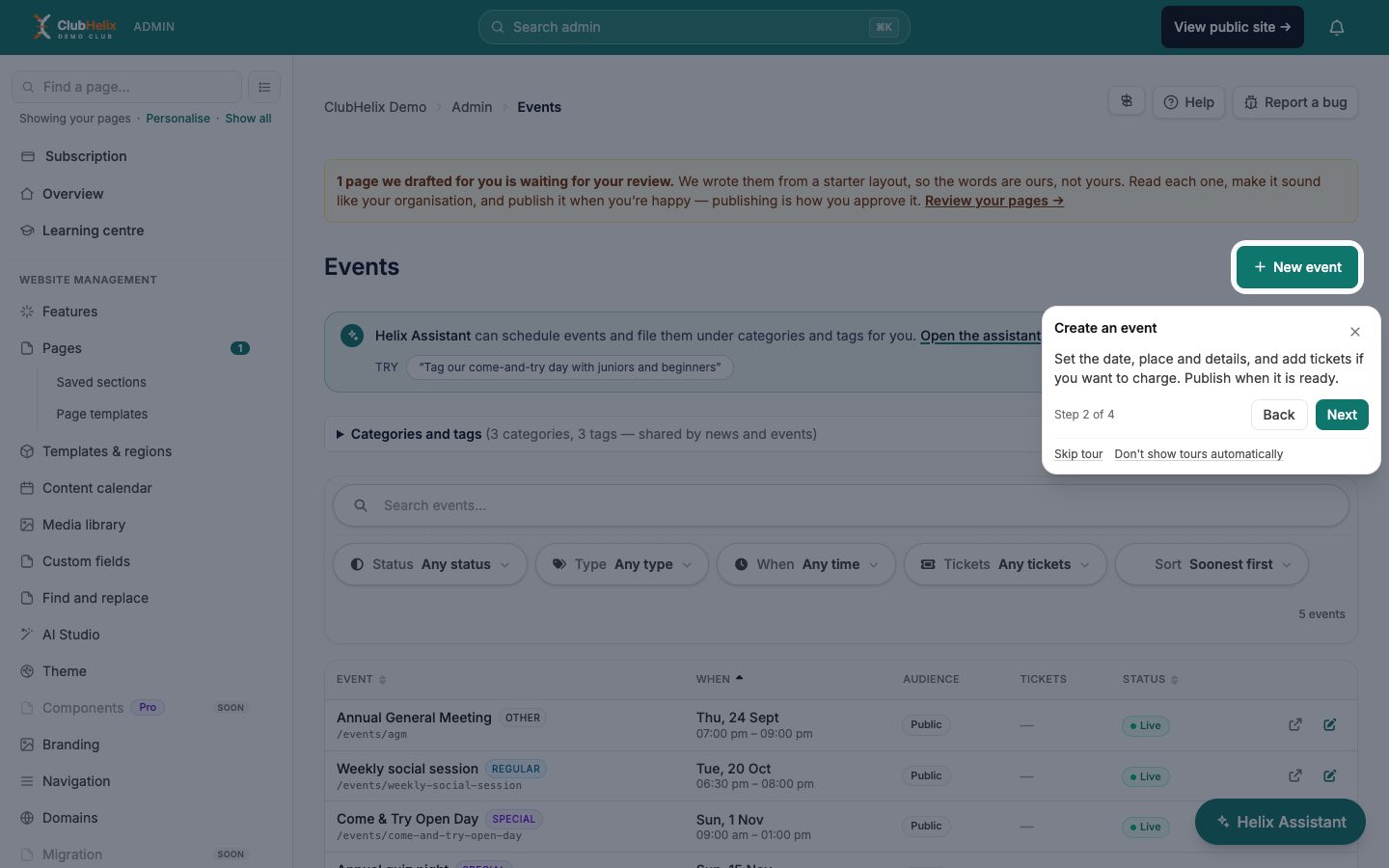
That gives you some practical advantages over the formats above:
- It's attached to the thing. There's no switching between a document and the screen, and nothing to go stale separately from the product.
- It's short. One page, one tour. A volunteer can take the tour for the page they're about to use and get on with the job.
- It's repeatable. They can run the same tour again next season, or after a long break, without anyone's time.
- It saves their place. Progress is stored against the person's account, so they can stop halfway and resume, including on a different device.
- It's kind to beginners. It can be opened any time, and it doesn't make anyone feel they're taking a test.
Alongside the single-page tours there's a main tutorial in the Learning centre (near the top of the sidebar). It has ten chapters: finding your way around, then one for each area of the admin, such as your website, members and registrations, communications, money and committee business. It's meant for the person who wants the whole map, and it opens each page for them as they go.
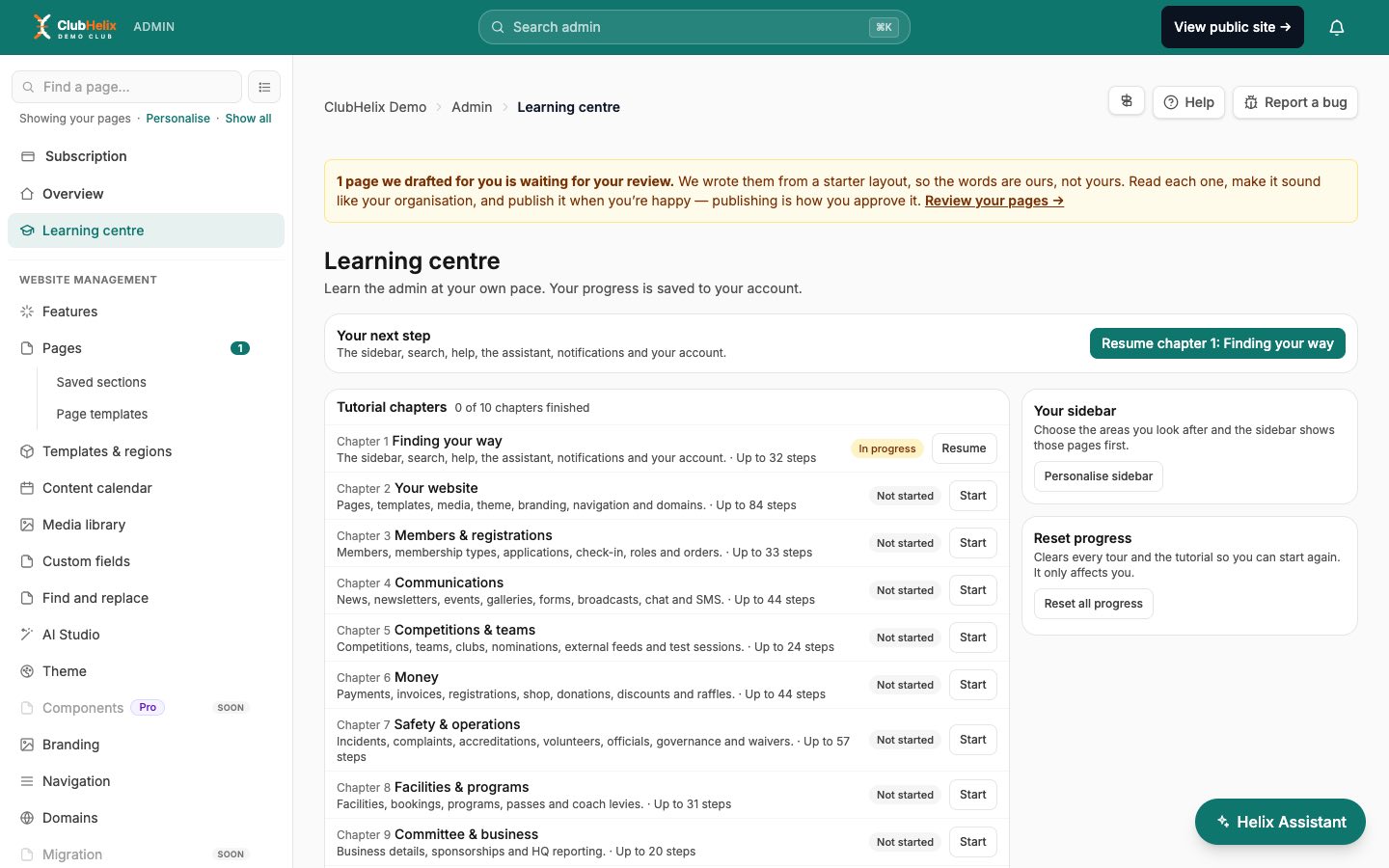
A session plan you can run in an evening
You can still use a person in the loop. The aim is to spend their time on judgement and let the software handle the "where is the button" part.
Before the session (10 minutes, you)
- Make sure each volunteer has their own account and a role that fits their job. Training someone on a screen they can't open is wasted effort.
- Pick two or three jobs per person that really recur, such as "approve an application", "post a news item" or "record a payment". Write each as a single sentence.
At the session (45 minutes, together or apart)
- Personalise the sidebar (5 minutes). Each volunteer picks the areas they look after, so the menu shrinks to their job. A treasurer ticks Money, a communications volunteer ticks Communications, and so on. If you'd like a role-by-role guide, see a club admin dashboard that shows only your jobs.
- Take the tour, then do the job (10 minutes per page). For each page, press Tour this page, then do the real task from your sentence list straight away. The tour shows where things are, and the task makes the memory stick.
- Ask "what if" (5 minutes). Ask them what they would do if something looked wrong. Show them where to look for help: the ? button opens the matching help page, and the Helix Assistant answers questions about how ClubHelix works.
- Write down one question each. The questions that survive the tour are the ones your own club needs to answer, such as "do we refund this?" These belong in your position descriptions, not the software.
After the session (5 minutes, a week later)
Ask each person to do one of their sentences unaided, and check how it went. A short follow-up is the best test of any training.
Where a person still has to step in
A tour tells someone how to do something. It can't tell them whether they should.
- Club rules. Your refund policy, your approval criteria and what counts as a late fee are decisions your committee has made. Put them in your position descriptions or your handover notes. The software can't know them.
- Judgement calls. A tour can show a volunteer the incident form. It can't help them decide how to talk to a worried parent.
- Trust and culture. Who to ask, when to escalate and how to disagree are learnt from people.
- The first real mistake. Someone will click the wrong thing. A buddy who can say "that happens, here's how to undo it" turns a mistake into a lesson.
The honest limits of in-app tours
We build these tours, so it's worth being direct about what they don't do.
- Tours point at what's on screen. They explain the controls on the page, not your club's policies.
- Steps skip when something isn't there. If a tour mentions a control that isn't on the page, such as a list with no entries yet or a panel your plan doesn't include, that step is skipped rather than leaving the volunteer stuck. A tour can therefore be shorter than its listed length. The Learning centre says "up to" a number of steps for this reason.
- Finished doesn't mean understood. A tour counts as finished when someone presses Finish or skips it. A person who closes the tab halfway shows as still in progress. Completion is a record of activity, not a measure of learning. Use a small real task to check understanding.
- A tour isn't a substitute for the first conversation. It works best after someone has told the volunteer what the role is for.
- Some people prefer paper or a person. That's reasonable. Offer a buddy for them, and keep a one-page cheat sheet of the club-specific rules.
Keeping training light for the long term
Volunteers come and go, and training that depends on a single enthusiast tends to go with them. Some habits help.
- Treat the built-in learning as the first layer. New people take the relevant tours before they ask anyone anything.
- Keep your own document short. A one-page sheet of club rules beats a manual, because it can be updated in a few minutes.
- Fold it into induction. Add "take the tour for your three main pages" to your new committee member induction pack, and put the tours into the checklist for each role.
- Protect volunteers' time. Every hour not spent on the software is an hour for the club. How to prevent volunteer burnout is a good companion read.
Frequently asked questions
Do volunteers have to finish the whole tutorial?
No. The ten-chapter tutorial is optional and made for people who want the full map. Most volunteers only need the tours for the three or four pages they use.
Can a volunteer turn the tour offers off?
Yes. Choosing Don't show tours automatically on any tour stops the "New here?" offers. The Tour this page button and the Learning centre keep working.
Can other people see how far a volunteer has got?
A person's progress is their own. Other people at the club can't see it, and the platform's statistics show overall figures only, not what a particular person has learnt. If you need to know someone can do a task, ask them to do it.
What if the software changes?
The tours live in the product and are updated with it, so you aren't maintaining screenshots. Your own document of club rules is the only part you need to keep current.
Try it on a real role
The quickest way to judge this approach is to try it on one volunteer and one job. Create your club's system, give a volunteer a role, and ask them to take the tour for the page they'll use first.
Keep reading — club volunteer induction and training covers the people side, from the first conversation to the refresher.

