Facility booking
Court 3, Tuesday, 7pm — booked.
Courts, pitches, arenas and rooms bookable on a drawable venue map — clash-proof, priced peak and off-peak, capped per member, paid by card or at the venue.
A court booking system on your own club site: draw the courts onto a venue map, set hours and pricing, and members book a court online instead of ringing whoever holds the diary this year. The same page handles arena hire for an equestrian club, lane bookings for a pool, and a clubroom the committee lets out by the hour.
The map
Draw the courts onto the venue itself
Draw your courts, pitches, ovals and clubrooms directly onto your venue map — plain canvas, or over an uploaded aerial photo so Court 3 is unmistakably Court 3. Each resource gets its own colour, and picking a slot on the availability grid highlights the court on the map, so nobody books the back oval thinking it was the front one.
Your rules
Hours, slots and who’s allowed to book
Every resource carries its own rules, and the public /book page enforces them automatically:
- Slot lengths from 15 to 120 minutes, with a cap on how many one booking can take
- Weekly opening hours per weekday — split sessions and lunchtime closures included
- An advance-booking window so the diary never fills months out
- Eligibility per resource: everyone, financial members only, or specific membership types
- Closures with a visitor-visible reason — resurfacing, carnival day — for one court or the whole venue
Pricing
Member rate, casual rate — per slot or per horse, paid by card or at the venue
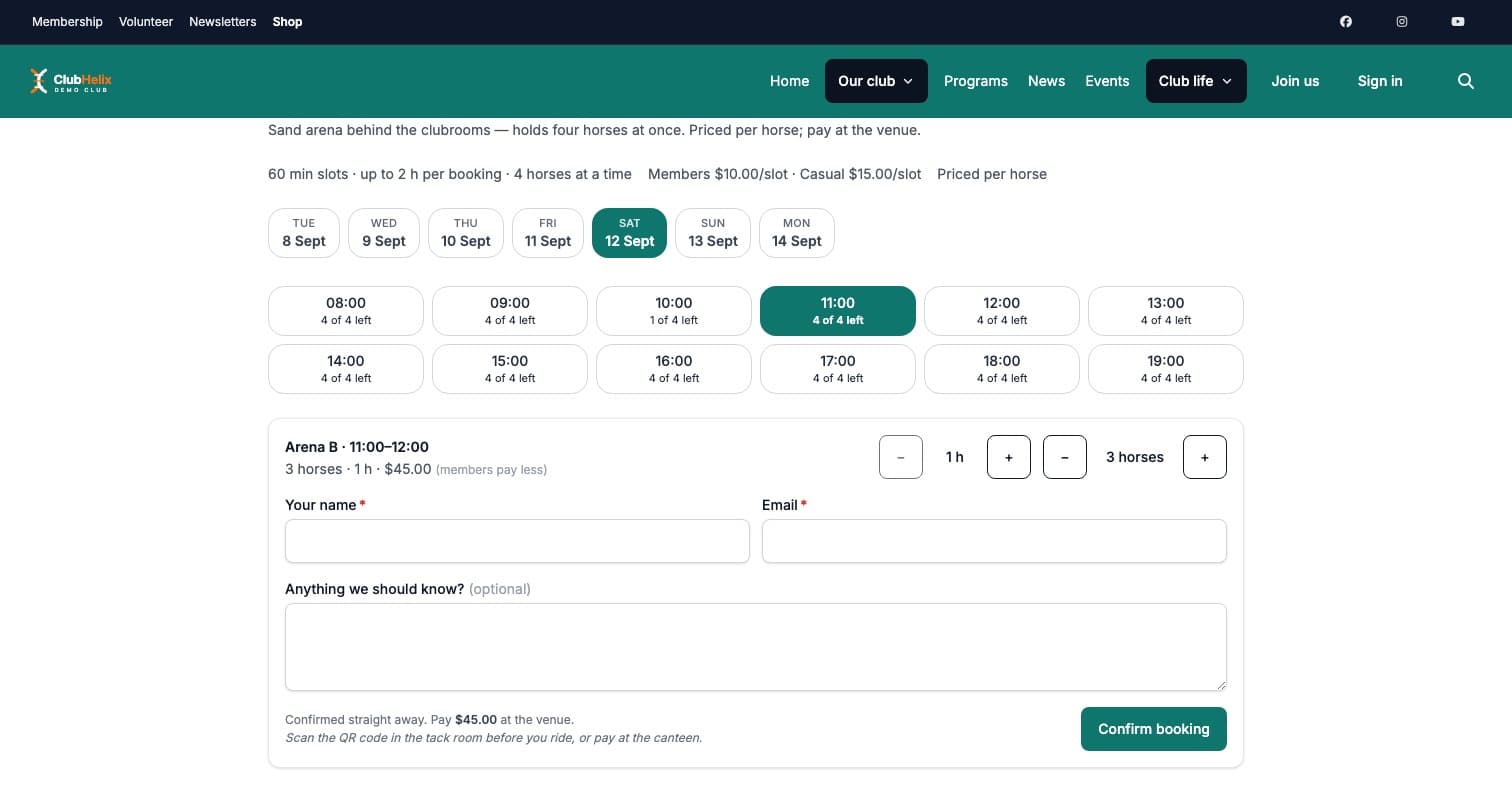
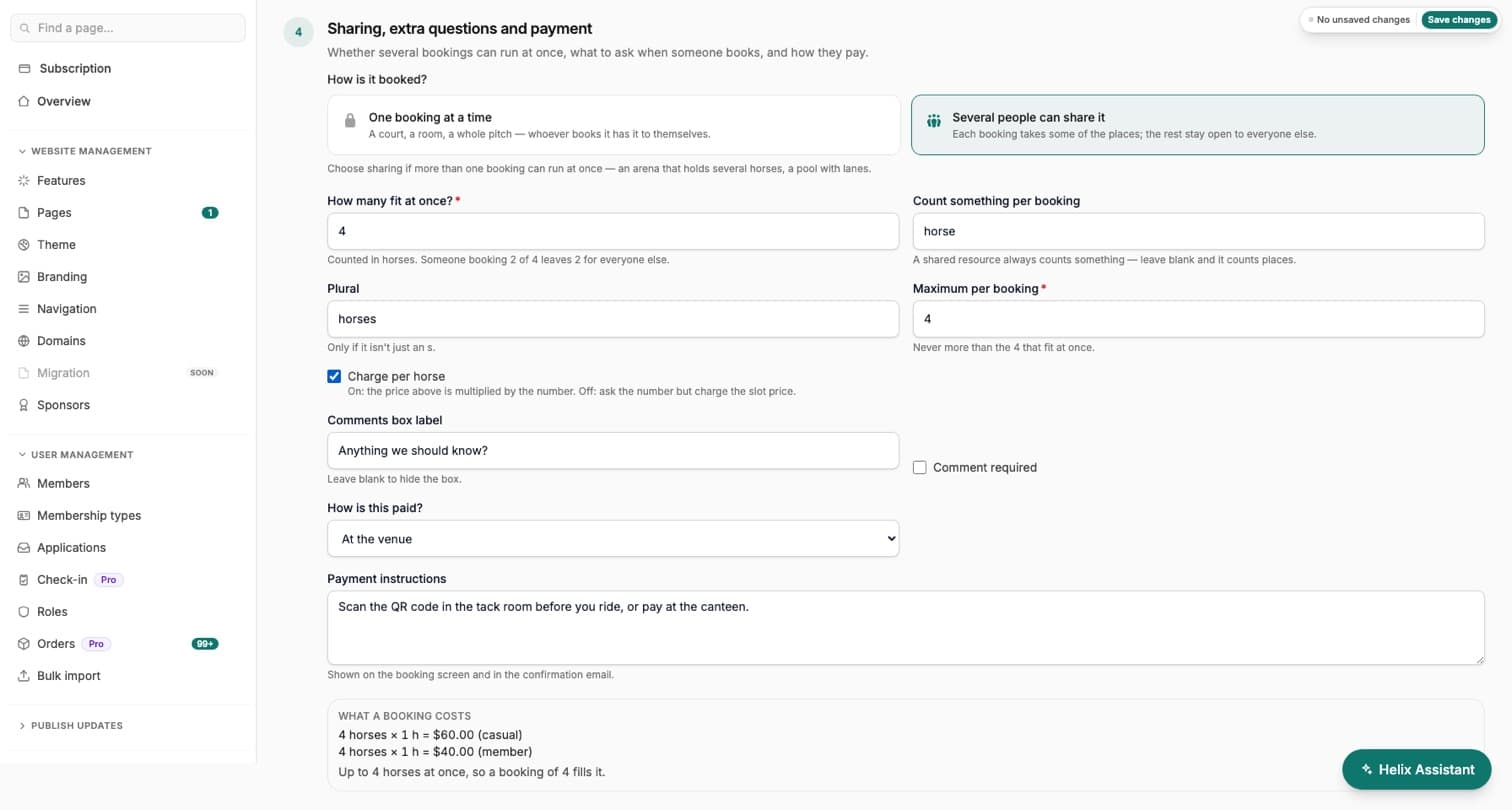
Members and casual visitors can pay different rates for the same slot, and either rate can be zero to make it free. Where the price depends on how many turn up, set it per horse, per player or per lane: the booker picks the number, and the total works itself out — four horses for an hour at $10 each is $40, on the booking screen and in the confirmation. Let a resource be shared, with a capacity, and several bookings run side by side until the places are gone: an equestrian arena that holds four horses, a pool with six lanes. Add a comments box so people can tell you what you need to know before they arrive.
Then choose how each resource is paid. By card at booking takes the money before the slot is confirmed, so the club is never chasing a court that has already been used. At the venue confirms the booking straight away and tracks what is owed — a QR code in the tack room, cash at the bar, EFTPOS at the desk — and the club marks it paid in the admin once the money arrives. A club can take bookings from day one with no payment processor set up, and guests can book venue hire without an account — a name and email gets them a confirmation.
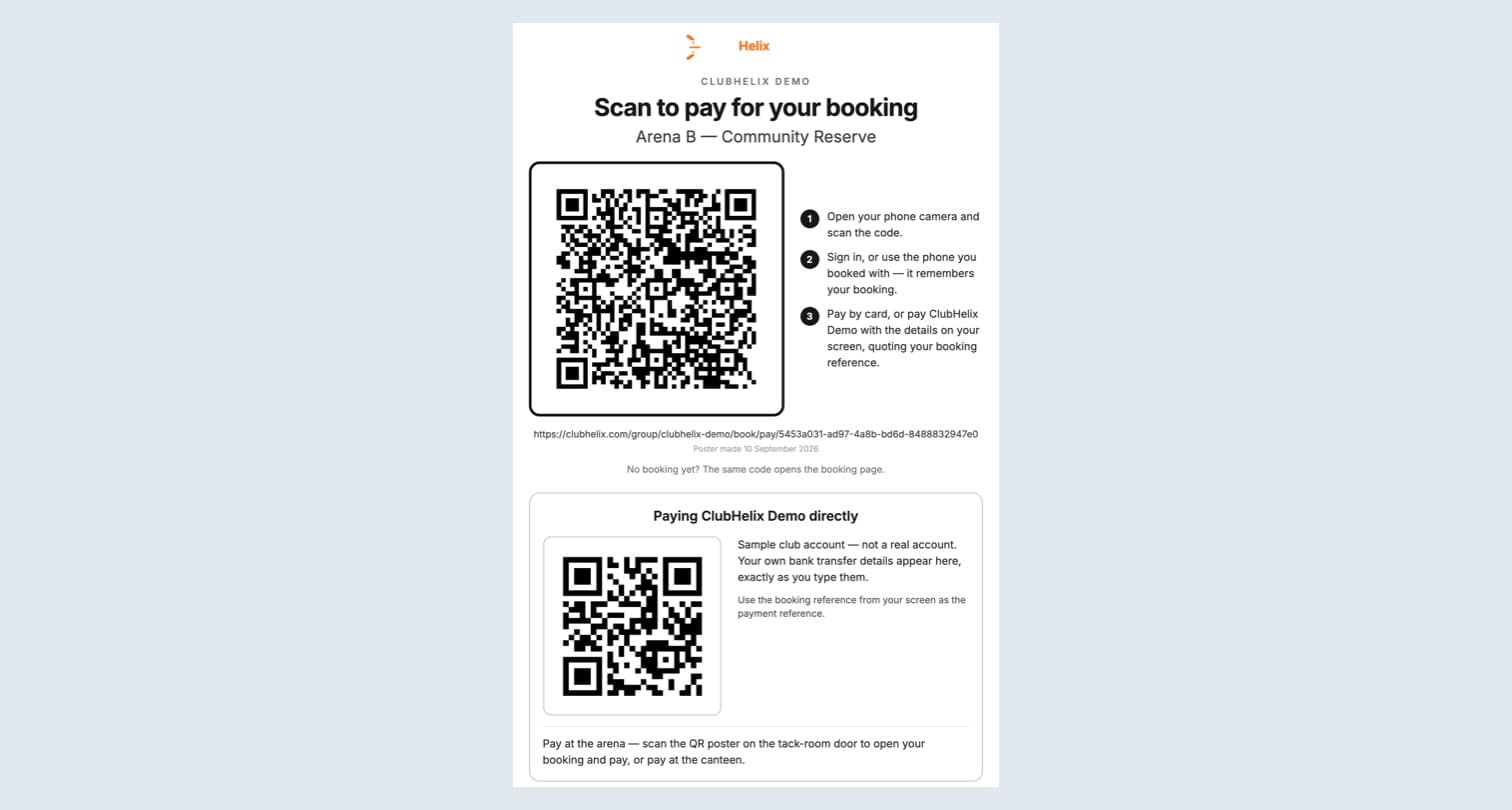
Then print the code. Facilities gives you a printable QR poster for each court and one for the whole venue — laminate it and put it where the money actually changes hands: the tack-room door, the bar, the court gate. Scanning it opens a pay page that already knows which booking the scanner is there for — their own bookings when they are signed in, the ones made on that device when they are a guest, or the link in their confirmation email. The page shows what is owed and a booking reference to quote on a transfer, then offers Pay by card through the club’s own payment provider — the club’s usual card fees apply — or the club’s own payment details: your payment QR image, a payment link or account details, set once for the whole organisation on the Paying at the venue card. Somebody who pays the club direct can press I’ve paid to tell you, which raises a Rider says paid flag on the booking; the club still confirms it with Mark paid, because a claim is never money.
Peak and off-peak
Charge the six o’clock hour as the six o’clock hour
Six to nine on weeknights is full and turning members away; ten on Tuesday is empty with the lights on. Peak court pricing is how a club recovers the cost of the hours people want and moves the flexible players into the hours they don’t. Set rates by time of day and day of week — a weeknight peak window, a weekend morning rate, an off-peak rate for the rest — and each rule carries both a member and a casual price, so the two dials you already have keep working underneath.
A booking is priced slot by slot, which is the only version members accept as fair: one that straddles the boundary pays both rates rather than whichever end it started at. The rate that applied is kept on the booking itself, so a later change to your off-peak court hire rates can never rewrite what somebody was charged — which matters the first time a member queries a receipt from March. The label you give a rule — “Peak”, “Twilight”, “Weekend” — shows on the grid tile and on the booking’s price breakdown, so nobody is surprised at checkout.
Clash-proof
Double bookings are impossible, not just unlikely
Double bookings are impossible by design: slot exclusivity is enforced at the database level, so two people can never hold the same court at the same time — even if they hit “book” in the same second. On a shared arena the places are counted instead: two riders in the same hour is the whole idea, and the fifth horse on a four-horse arena is refused, not seated. And in the rare race where a payment lands after its slot hold expired, the booking is flagged for review instead of anyone being silently charged for a court they don’t have.
Not only places
Book a coach or a ball machine, not just a court
A resource does not have to be a place. It can be a person — a coach, an instructor, a physio — or a piece of equipment, like a ball machine or a hired set of tables. Each books exactly like a court: same availability grid, same clash guard, same checkout, so “book a lesson with Alice” and “book Court 3” are the same act to the person doing it.
The point is the one calendar underneath. A coach taking a private lesson and the same coach running Tuesday squad are commitments on one diary, so they clash properly — a coach cannot be double-booked across two courts, whatever a club typed into a capacity box, because a person is a capacity of one and cannot be in two rooms at once. A rostered coach shows on the public grid as genuinely unavailable, rather than being invisible until somebody complains. The link between a person-resource and the account behind it is staff-only and never published on your public site.
Fair use
Caps, cancellation notice and no-shows
Two members holding prime time every week is the complaint every committee eventually hears, and it is usually settled by a volunteer having an awkward conversation. Set a per-member cap instead — so many bookings per day, week or month, counted on one court or across the whole venue — and it is enforced at the moment the booking is made, in the database, rather than displayed as a rule nobody reads. The allowance runs on the cycle you chose, and a cancellation gives the booking back, because a cap is meant to stop hoarding, not to punish somebody who freed the court up.
Cancellations are the other half. A club that allows a free cancellation up to the minute the slot starts has no way to resell prime time, so you can require notice — any window up to a fortnight — and a cancellation inside the window is refused rather than quietly allowed. That is the whole of a workable late cancellation policy, enforced instead of published.
When somebody simply does not turn up, your staff mark a no-show. Members cannot set it on themselves, it only applies to a booking that has already been and gone, and it is reversible, because staff get it wrong and somebody who did turn up should not wear it. The slot goes back on the grid, but the booking still counts against that member’s allowance — which is the consequence that actually changes behaviour. The status sits on the booking itself, so the Bookings admin is where you see who did not turn up while the committee works out what its court booking no-show policy should say. One honest gap worth knowing before you go looking: the Cancellations & no-shows report counts cancelled and refunded bookings by outcome today, and does not yet fold no-shows into that count. Treat a no-show fee as a separate decision: ClubHelix records the status, and charging for it is a conversation your club has, not something the system does behind you.
One honest limit worth knowing before you switch a cap on: it can only bite on a booking made by somebody the club knows. A guest booking venue hire with a name and an email has no membership to count against. A court you want capped should be members-only, with casual hire priced instead.
Day to day
Facility booking software the committee barely touches
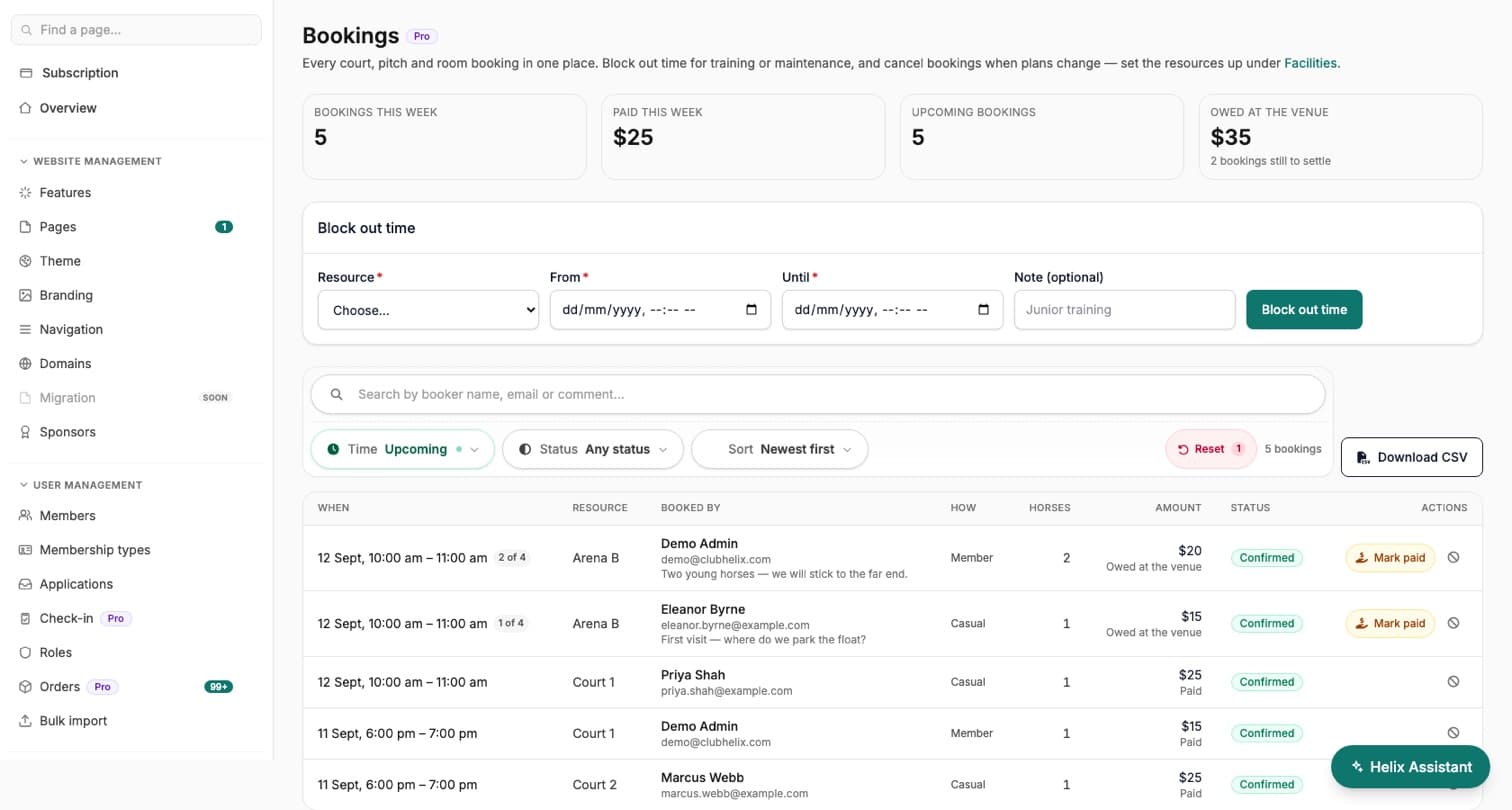
The Bookings admin is a live, filterable view of who’s on which court, how many horses or players they brought, what they paid and what is still owed at the venue — with a one-click Mark paid and a CSV export. Admin blocks hold time for maintenance or coaching — outside public hours if need be — cancellations return slots to the grid straight away, members self-cancel their own bookings, and refunds issued at your payment provider reconcile back automatically.


See it with your club's name on it
Spin up a fully-branded site in under 30 minutes, free — no technical skills needed.