For club registrars & membership officers
Sign-on season without the shared spreadsheet.
Registrations arrive already paid and already validated, renewals chase themselves, and the census your association asks for every year is a report rather than a fortnight of counting.

What makes the registrar job hard
None of this is the interesting part of running a club. All of it is why the role is hard to fill.
- A registration spreadsheet three people edit at once during sign-on week.
- No reliable way to tell who renewed, who lapsed, and who never finished paying.
- Counting the season census by hand for a form that is due next Friday.
- Emergency contacts and medical notes scattered across paper forms and inboxes.
- Being asked for the same numbers by the association, the council and the grant body — in three different shapes.
How ClubHelix handles it
The platform mapped onto the moments the registrar job actually runs on.
Sign-on
Members register and pay on your own site, with the questions your club actually asks and the conditions they have to accept. There is no re-keying step, because nothing was ever on paper.
Families
One parent account registers several children in one go, with dependants, guardians and consents recorded against the right people.
Renewals
Paid-up dates are tracked per member, reminders go out on schedule, and the renewal funnel report shows exactly where people drop out between the reminder and the payment.
Lapsed and at-risk
Lapsed and at-risk members are their own report, so a win-back run targets the people who actually left rather than the whole list.
The census
Headcount by type, team, age band and season — the shape a participation return or funding acquittal asks for, exportable as CSV or PDF without a fortnight of counting.
Compliance on the roster
Working-with-children checks, coaching accreditations and signed waivers sit against the member record, with expiry reporting so nothing lapses mid-season.
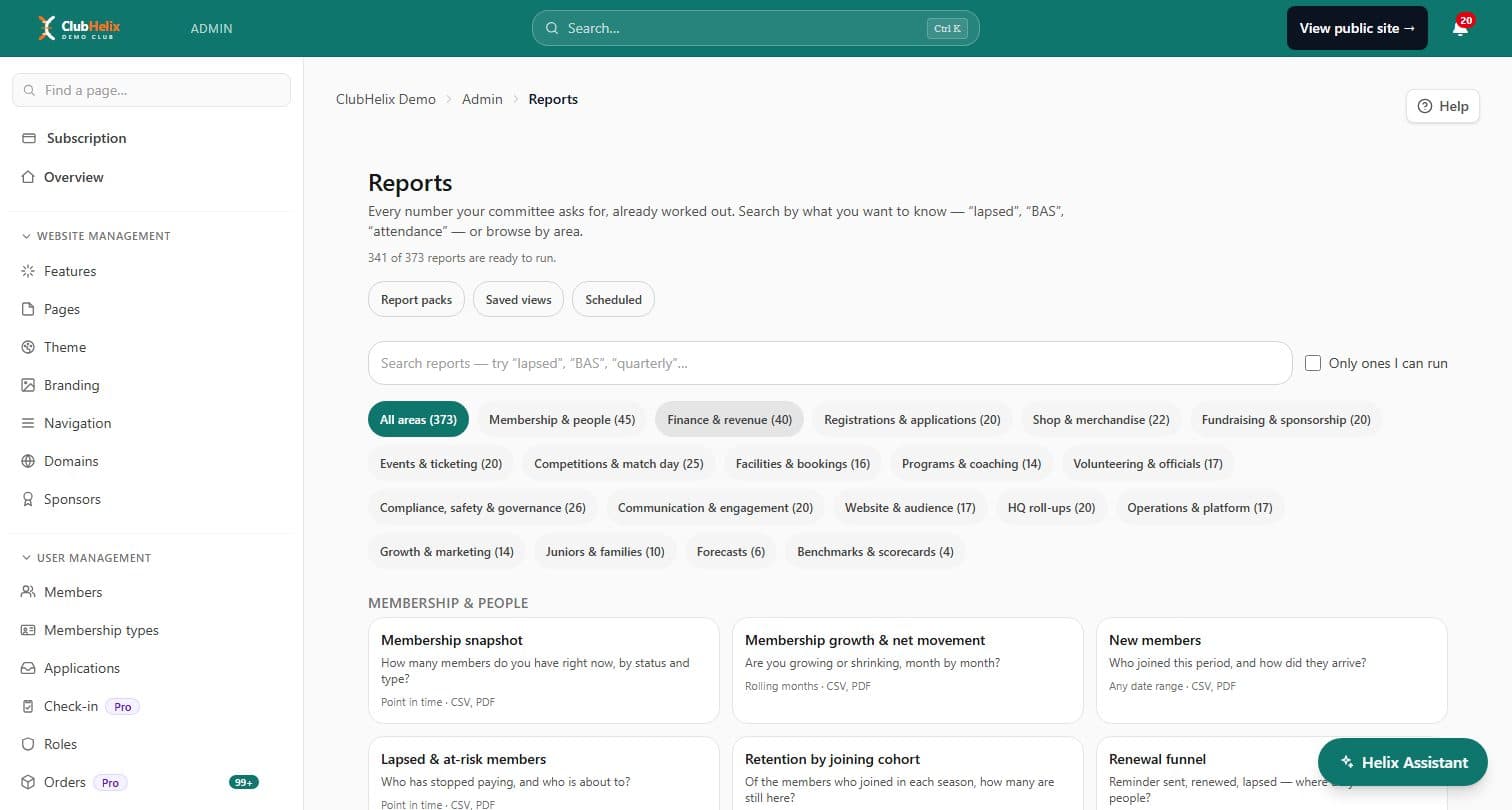
The reports you will live in
A handful of the hundreds in the catalogue — the ones a registrar opens most. Each states how it was calculated, so the number can be argued with.
- Membership snapshot
- The roster as at any date, by status and membership type.
- New members
- Who joined this period, and how they arrived.
- Lapsed & at-risk members
- Who has stopped paying, and who is about to.
- Renewal funnel
- Reminded, renewed, lapsed — and where in the sequence people drop out.
- Retention by joining cohort
- Of the members who joined in each season, how many are still here.
- Membership by type
- Junior, senior, family and social splits — the shape a census return wants.
See the whole reporting feature →
Frequently asked questions
- Yes — bulk import takes a CSV of your existing members, and the roster keeps working from there. You do not have to start sign-on season from an empty list.
- It collects what your registration form asks for, and reports on what has been collected. Some funding returns ask for demographic detail the club has never gathered — those reports say so plainly rather than presenting a partial count as a complete one.
- Every membership report states its definition on the page. That is deliberate: "active" means something slightly different to a registrar, a treasurer and an association, so the report says which one it used instead of leaving you to guess.
- Not unless you give them a role at your club. A parent body gets aggregate roll-ups — participation and compliance totals — computed in the database. Member rows never cross the boundary.
- Records come in as a CSV, with duplicate detection and a dry run so you see exactly what would be written before anything is. The honest constraint sits at the other end: what you can get OUT of your current system varies enormously, so export it and open the file before you commit to a move. Nothing that was never recorded can arrive — if consents, join dates or emergency contacts are missing from the export, they are missing, and the registration form is how you collect them properly rather than guessing. Member data also carries privacy duties on the way across; the guide below covers those.
Can I import the roster we already have?
Does it collect ages and other demographics for our census?
What counts as an "active member"?
Can our association see our member data?
Can we move our member records across without losing anything?
Other committee roles
A club runs on more than one volunteer. Here is what the platform does for the rest of the committee.


Stop rebuilding the same spreadsheet.
14-day free trial of paid features — nothing to pay today, cancel any time before the trial ends.