
What this guide answers
- Can a new platform import our website automatically?
It can read and copy what your site publishes publicly — page text, headings, images and news.
- Will we lose our search rankings?
Only if you skip the redirects. Search engines treat a moved page as a new page unless you tell them otherwise, so every old address needs a permanent redirect to its new equivalent.
- What happens to our club email addresses?
Hosting and email are separate services sharing one domain name.
- When is the best time to move?
The off-season, after the last significant payment run and well before your next registration day.
- Do we have to move all our old news articles?
No, and most clubs should not. Move the pages that answer questions — how to join, where we play, fees, policies — plus the last season or two of news, and keep an offline archive of the rest.
Canada edition. This guide is written for volunteer-run clubs in Canada. Where rules differ — grants, tax, incorporation, safeguarding — follow the Canada-specific pointers below or check with your national body.
Most community clubs move their website about once a decade, which means the committee lumbered with the job has almost never done it before.
That inexperience is the real problem, not the technology. Nobody in the room knows which parts are genuinely difficult, which parts are one evening of typing, and which parts will quietly break three months later when a parent searches for your training times and lands on a page that no longer exists.
This guide sets out the honest version: what transfers, what has to be rebuilt, what can never move at all, and the order of operations that keeps you out of trouble. If you are moving your whole administration rather than just the website, read it alongside our guide to switching club management software, which covers the payments and membership side in more depth.
What actually transfers, and what does not
Committees imagine a website move as one big transfer, like pouring a bucket from one container into another. It is not. It is several separate jobs of very different difficulty, and the trouble comes from treating them as one.
| What you have | How it moves | The honest note |
|---|---|---|
| Pages, news, results | Copied across, mostly by hand or by an assisted import | Text is easy; unusual layouts are rebuilt, not converted |
| Photos and documents | Downloaded from the old site, uploaded to the new one | Grab the originals if you still have them — site copies are already shrunk |
| Member records | An export file from the old system, imported into the new one | Cannot be read off your public website; you must be given the file |
| Payment history | An export, kept as a record | Historical only — it becomes a spreadsheet, not a live ledger |
| Stored cards, direct debit | It does not move at all | Every payer re-authorises on the new system. No exceptions worth planning for |
| Your domain name | Transfers cleanly if the club owns it | If the old platform owns it, that is a much bigger problem — see below |
| Search rankings | Preserved by redirects you set up, not by the new platform | This is the single most common self-inflicted injury |
Read that table with the committee before agreeing a timeline. Half the arguments about website moves are really arguments about which row somebody was imagining.
Why members and payments cannot simply be scraped across
Modern tools can read a public web page remarkably well. A home page, a news article, a fixtures list — all of that is published to the world, so any system can fetch it and make a sensible copy.
Your member roster is not published to the world, and that is the whole point of it. Names, dates of birth, emergency contacts and medical notes sit in a database behind a login, where no new platform can see them however clever its import tool is.
So the member list moves one way only: your current platform gives you an export file, and you load that file into the new system. If you have never asked for one, ask now, in writing, while you are still a paying customer with full access. Our guide to moving club member data between systems covers what a good export looks like and the privacy duties that ride along with it.
If the answer is "we do not offer an export", you have learned two things at once: you have a problem to solve, and you have your final confirmation that leaving is the right call. Data you cannot take with you was never really the club's.
The one thing that genuinely cannot move: stored payment details
This is the fact most likely to be glossed over in a sales conversation, so here it is plainly.
Saved card details and direct debit authorities do not transfer between systems. They are held by a payment processor, against the merchant account that collected them, under an authority the member gave to a named organisation through a named platform. A different platform means a different arrangement, and the authority the member signed does not stretch to cover it. Large enterprises can occasionally arrange a formal transfer of stored card tokens between processors; for a community club it is rarely offered and rarely worth the paperwork, so assume it will not happen.
What that means in practice:
- Every member with a saved card or an active debit arrangement must set it up again. There is no button that does this for them.
- Plan the re-authorisation as a campaign. Announce it, explain why, give a deadline, and chase the stragglers by phone.
- Never let it collide with renewal week, or a member asked to re-enter card details while being asked to renew reads the whole thing as a price rise.
- Keep the old arrangement running until the new one is confirmed, then cancel — in that order, member by member, so nobody is billed twice and nobody is billed by nobody.
Handled openly, this is a mild inconvenience and a good excuse to talk to every member. Handled by surprise, it is why a treasurer spends a season reconstructing who is actually paid up.
What it costs in volunteer hours
Nobody can quote you a figure, and anyone who does is guessing about a club they have never seen. You can estimate the shape of the job from things you can count today.
- Count your pages. Open your current site and list every page a visitor can reach. A club with eleven pages and a news feed is an evening or two of rebuilding. A club with ninety pages, twelve years of match reports and a sponsor page per sponsor is a project with a roster.
- Count your fields. Look at the columns in your member export. Ten tidy columns import in an afternoon. Forty columns with free-text notes, half-used custom questions and three different date formats need a clean-up pass first, and the clean-up is the work.
- Count your active payers. That number is the size of your re-authorisation campaign, and it is the only part of the move that runs on member time rather than volunteer time.
- Count your inbound links. Anything printed, laminated or shared — the QR code on the clubroom door, the link on the council's facilities page — is a redirect you will need.
Then add the cost that catches everyone: decision time. Rebuilding a page makes the committee re-argue what belongs on it. Agree in advance that version one is a faithful copy and improvements come later.
The order of operations
The order matters more than the tooling. Almost every horror story is an ordering mistake, not a technical one.
1. Export everything while your access is still strong
Member list, payment history, form questions, email templates, the sponsor contact list — before you have told anyone you are leaving. This costs nothing if you decide to stay.
2. Save a list of your current web addresses
Visit yourclub.org/sitemap.xml and save what you see, or click through the site and write down every address. This list is the raw material for your redirects, and it disappears the moment the old site does. Our guide to keeping your search rankings when you change club website explains what to do with it.
3. Build the new site alongside the old one
On a temporary address, with the old site still live and still taking registrations. Get the new one genuinely finished — every page, every form, every payment path tested with a real card — before anything switches.
4. Import members and check the numbers
Import, then count. Does the member total match? Do the age groups line up? Spot-check ten records against the old system, including one awkward family with three children and two contact addresses. A dry-run preview reporting what will be created, updated and skipped is worth far more than an import that simply says "done".
5. Map old addresses to new ones
Every important old address gets a permanent redirect to its new equivalent. Not to the home page — to the page that answers the same question.
6. Point the domain at the new site
Only once everything above is finished. If the club owns its domain, this is a DNS change and your web address survives the move untouched. Check your email first: club email on the same domain is configured separately, and a careless DNS change can stop the secretary's mail.
7. Run the payment re-authorisation campaign
8. Cancel the old platform last
Cancel only after the new site has run correctly for a full billing cycle, your exports are in more than one place, and the domain is confirmed under club control.
Where the club owns the domain — and where it does not
If your club registered its own domain, you are in good shape: it points wherever you tell it, and moving platforms never changes your web address. If you have not checked, check today — our guide to buying a domain for a club covers confirming ownership and getting it into the club's name rather than a former secretary's personal account.
If your current platform owns the address — anything shaped like theirplatform.com/yourclub — then your printed materials, sponsor links and search rankings all point at property you do not control. You cannot redirect it and you cannot take it. Register a club-owned domain now and treat the switch as a fresh start you have chosen.
Doing it on ClubHelix
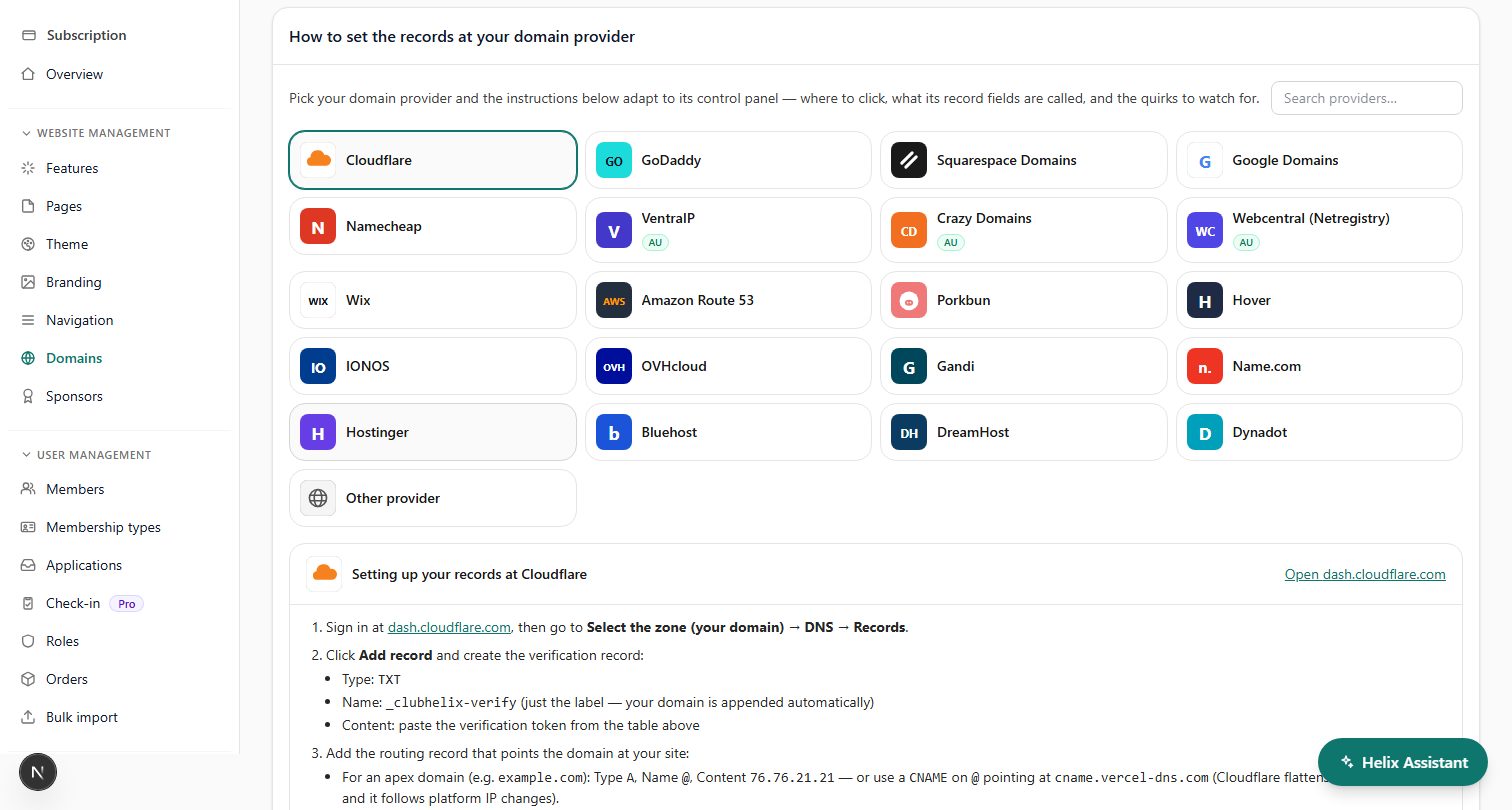
If ClubHelix is where you are heading: your own domain connects with guided DNS steps and a certificate issued automatically once it verifies (custom domains), pages are rebuilt in a drag-and-drop page editor rather than in code, club colours are set once in theme settings, uploaded images collect in a media library with their alt text and the pages they appear on, news posts and events take categories and tags again, the few custom CSS rules you still need can go in a checked, size-limited stylesheet on the Pro plan, and an existing roster comes in by spreadsheet import with duplicate detection and a dry-run preview.
What we will not pretend: the content still has to be moved by people who know what it should say, and the payment re-authorisation is unavoidable on any platform. If your committee would rather not do the typing, our done-for-you service includes the migration. Otherwise you can start free, build alongside your current site, and switch when it is genuinely ready.
Frequently asked questions
Can a new platform import our website automatically?
It can read and copy what your site publishes publicly — page text, headings, images and news. It cannot reach anything behind a login, and it cannot reproduce a bespoke layout exactly. Treat any automated copy as a first draft a volunteer still reviews page by page.
Will we lose our search rankings?
Only if you skip the redirects. Search engines treat a moved page as a new page unless you tell them otherwise, so every old address needs a permanent redirect to its new equivalent. Do that and rankings usually recover within weeks.
What happens to our club email addresses?
Hosting and email are separate services sharing one domain name. Before changing any DNS records, write your existing mail records down exactly and carry them across unchanged, or the club inbox stops working the moment the site goes live.
When is the best time to move?
The off-season, after the last significant payment run and well before your next registration day. Never during registration, never in finals, and never in the week your treasurer is preparing for the annual general meeting.
Do we have to move all our old news articles?
No, and most clubs should not. Move the pages that answer questions — how to join, where we play, fees, policies — plus the last season or two of news, and keep an offline archive of the rest.


