Custom domains
Your club at your own address.
Bring your own domain on Standard and above, or on Free with one of 200 founding places — certificates, sitemaps and Google Search Console registration all handled for you.
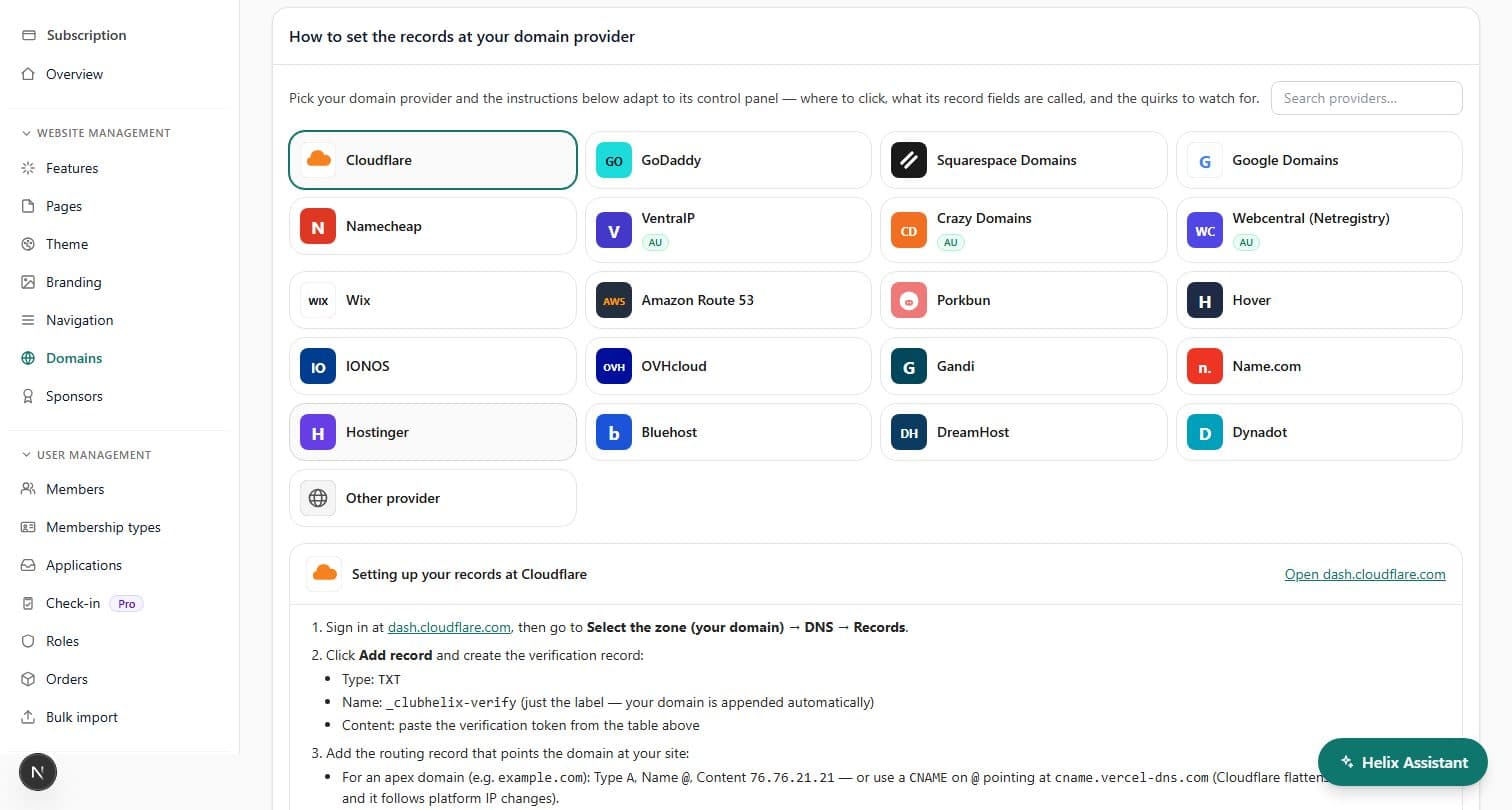
Connect a custom domain for your club website and members reach your ClubHelix site at your own address — certificates, sitemaps and search-engine registration all handled for you.
Guided setup
Two DNS records and a cup of tea
Add the hostname, pick your DNS provider from the built-in guide — over twenty providers, including the large international registrars — and the instructions adapt to that provider’s control panel, down to what its record fields are called, with a direct link to its DNS console. Every record value has a copy button, and a re-check button confirms the moment DNS goes live.
Certificates are issued automatically once DNS verifies, so visitors always get the secure padlock — no renewal reminders on the committee to-do list. Custom domains come with the Standard plan, and the Pro plan can connect more than one. On the Free plan, one of 200 founding places lets an organisation connect its own domain and be indexed on it, free: request one from the Domains page and the ClubHelix team reviews it.
One address
Apex and www, both sorted
Add either yourclub.com or www.yourclub.com and we stage the other automatically, with the right redirects so there is only ever one canonical address. Old links keep working too: renamed sites 301 to their new home, and search engines are told about the move.
Club SEO
Get your club found on Google
Club website SEO is looked after from day one: your site ships a sitemap that updates itself as you publish, and your custom domain is registered with Google Search Console automatically, with the sitemap submitted for you. Getting your club found on Google should not depend on a volunteer who knows what a sitemap is.
Every page you build in the canvas editor carries its own search title, description and share image, so the domain has something worth ranking.
No dead ends
Written for club volunteers, not sysadmins
The setup screen knows the traps: Cloudflare users are told to keep routing records DNS-only so certificates can issue, apex domains get the right A-record alternative when a registrar can’t take a CNAME, and a “verify it yourself” section shows the exact checks to run before you press re-check. Provider not in the grid? Generic steps cover the record-name variations most control panels use.


See it with your club's name on it
Spin up a fully-branded site in under 30 minutes, free — no technical skills needed.