
What this guide answers
- How long should a court booking slot be?
Match the slot to how the sport is played: 60 minutes for a tennis or pickleball hit, 90 for doubles, 40 or 45 minutes for squash, and 30 minutes for a coaching court.
- Can a club take court bookings online without a card processor?
Yes. Set the court to be paid at the venue: the booking is confirmed straight away, the booker is told what to pay and how (a QR code, the card reader at the bar, cash), and the admin shows what is owed until it is…
- How do we stop one person booking every prime slot?
Use the rules the diary never could: a cap on slots per booking (two hours on weekends is common), an advance-booking window of about a week for members, and eligibility set to financial members on the peak courts.
- Should members book courts for free?
Many clubs make member bookings free and charge casual visitors, which turns the booking page into a membership sales tool: a casual who books every weekend soon sees a membership paying for itself.
- What stops two people booking the same court at the same time?
A real booking system refuses the second booking at the database, not in the web page, so if two members tap "book" on the same slot in the same second exactly one of them gets it.
Canada edition. This guide is written for volunteer-run clubs in Canada. Where rules differ — grants, tax, incorporation, safeguarding — follow the Canada-specific pointers below or check with your national body.
Somewhere in your club there is a diary. It lives behind the bar, or in the coach's car, or in the head of the one member who has "done the courts" for eleven years and would quite like to stop. Members ring, text and message to book; someone writes it in; someone else turns up to find two doubles groups standing on Court 3 with the same time written next to both names.
The diary has three faults no amount of care removes: there is only one copy, so every booking is a conversation at dinner time; it has no rules, so it can't tell a paid-up member from one who lapsed two seasons ago; and it can't take money, so casual hire is paid in cash, later, sometimes. Online court booking fixes all three, but only if you decide the rules before you switch anything on. This guide walks through those decisions first, then shows how they land in a real booking system, with ClubHelix as the worked example in the final third.
The six decisions to make before you switch it on
Every court booking system asks the same six questions, whether it asks them on a settings screen or you answer them by accident. Decide them on purpose, as a committee.
| Decision | Typical answer | Why it matters |
|---|---|---|
| Slot length | 30 or 60 minutes (squash often 40 or 45) | Sets the grain of the whole grid — hard to change once people are used to it |
| Maximum slots per booking | 2 hours on weekends, 3 on weekdays | Stops one group holding a court all afternoon |
| Advance-booking window | 7 days for members, less for casuals | Keeps prime time from being booked out weeks ahead |
| Member vs casual price | Members free or discounted; casuals pay | The membership perk that sells memberships |
| Who can book | Everyone, paid-up members only, or types | Protects members' access at peak times |
| Opening hours | Per weekday, including split sessions | Lights, coaching mornings, and the neighbours' goodwill |
1. Slot length
Match the slot to how the sport is played: 60 minutes for a tennis or pickleball hit and 90 for doubles, 40 or 45 minutes for squash, 30 for a coaching court. Anything from 15 to 120 minutes is normal. Pick one length per court and leave it alone — members learn the grid's rhythm quickly and resent it changing.
2. Maximum slots per booking
A cap of two consecutive slots on weekends and three on weekdays stops one group holding Court 1 from nine until two, without a volunteer having the awkward conversation. A group that genuinely needs longer — a social round-robin, a school visit — is an admin block, not a public booking.
3. The advance-booking window
Too far ahead and the keen few book every Saturday morning for the season; too short and families can't plan. Seven days is a sensible default for members, and some clubs give casual bookers a shorter horizon so members get first look at the weekend.
4. Member price versus casual price
The same slot usually carries two prices, and either can be zero. Many clubs make member bookings free and charge casuals, which turns the booking page into a quiet membership sales tool. Price casual hire against the nearest public courts, with a gap wide enough that a regular casual can see a membership paying for itself.
The shape matters more than the numbers: members free or heavily discounted, casual hire priced just under the nearest public courts, and a per-player rate on coaching courts. A casual who plays every weekend should reach the cost of a membership within a few months — and that is exactly what you want them to notice.
5. Who is allowed to book
Three settings cover nearly every club: everyone (open to the public, priced accordingly), financial members only (the paid-up roster), or specific membership types (full members but not social members, say). Set it per court: keep Courts 1 and 2 members-only and open Court 3 to the public, or open everything in winter when the courts sit empty.
6. Opening hours, split sessions and lights
Set hours per weekday, not one blanket range, with split sessions where the coaching program takes the middle of the day. Lights are the sharp edge: the grid must end when the lights go off, and if the club charges more for lit courts, set an evening rate on the court by time of day and day of week rather than splitting the court into two listings. A booking that crosses the boundary is priced slot by slot, so the hour before dusk and the hour after it each pay their own rate.
Who counts as a member
"Members only" is only useful if the system knows who the members are, and the honest test is financial status: a member who has paid this season's fees is financial, one who hasn't is not. That means the roster and the booking page need to be the same system — a court booking tool bolted onto a separate membership list will happily give the member rate to someone who lapsed in March. Our guides to running a tennis, pickleball or squash club cover the membership side in depth.
Give every court its own place on the map

Court numbering is obvious to people who have played at your club for a decade and baffling to everyone else. A map on the booking page — courts drawn onto a plan or an aerial photo, each with its own colour — means a casual booker turns up knowing Court 3 is the one past the clubhouse, and picking a slot on the grid highlights the court on the map. Give each court its own rules, too: the synthetic court that drains fast stays open after rain, the court by the houses closes earlier, the coaching court is members-only.
Why two people can never hold the same court
A shared calendar lets two people write in the same slot and sorts it out later; a booking system refuses the second. The refusal has to happen at the database, not in the web page: if two members tap "book" on the same slot in the same second, exactly one gets it and the other is told the slot has gone. Ask any tool you consider what happens in that case — if the answer involves a person noticing afterwards, keep looking.
Let non-members book too
Casual bookings are income and your best recruiting channel — the person who hires a court three times is halfway to joining. Let them book without an account: a name and an email address is enough for a confirmation, and the casual price is charged automatically because the system can see they aren't on the roster.
Cancellations: let members do it themselves, and write the policy down
Half the calls the diary generates are cancellations. Let members cancel their own bookings from their account, so the slot goes straight back on the grid, and decide the policy the system enforces: free cancellation up to a cut-off (24 hours is common) with any card payment refunded, and a late cancellation that releases the slot but keeps the fee. For weather, decide in advance who calls it — closing a court with a visible reason on the grid ("Court 2 closed — resurfacing") saves the volunteer texting everyone individually. Put the policy on the booking page itself, not in a PDF nobody opens.
Card at the time of booking, or pay at the venue?
You don't need a card processor to start taking bookings. There are two honest ways to be paid for a court:
- Card at the time of booking. The money is taken before the slot is confirmed, so the club is never chasing someone for a court already used, and cancellations are mechanical — refund the card, release the slot.
- At the venue. The booking is confirmed straight away, and the booker is told what to pay and how — a QR code on the clubhouse wall, the card reader at the bar, cash in the honesty box. The club keeps a list of what is owed and marks each booking paid when the money arrives.
Venue payment suits a club just starting out and any club where refunds are a headache — if nothing was taken online, there is nothing to refund online. The trade-off is that a human still checks the money came in. Many clubs start this way and switch to card payment once the bookings prove the demand.
Counting players
Most court bookings don't need a headcount — a court is a court, whoever is on it. Two situations do. If you want to know how many are coming, ask "how many players?" at booking and charge the court rate regardless. If you charge per player — a coaching court, a cardio session — the booker picks the number and the price multiplies, so six players at the per-player rate is worked out on the booking screen, not by the coach with a calculator. Either way, name the thing you're counting ("player", not "unit") and cap it at the court's sensible maximum.
Setting it up on ClubHelix: the worked example
Everything above is a setting in ClubHelix facility booking, and a club can have its courts live in an evening:
- Draw the venue. On the locations page, draw each court onto the venue map — a plain canvas, or an aerial photo underneath so Court 3 is unmistakably Court 3.
- Set each court's rules. Slot length from 15 to 120 minutes, a cap on slots per booking, an advance-booking window, and opening hours per weekday with split sessions. Closures — one court or the whole venue — carry a reason visitors can read.
- Set the two prices. A member price and a casual price per slot, either of which can be zero. Financial members get the member rate automatically; a lapsed member sees the casual price.
- Choose who can book. Everyone, financial members only, or specific membership types — per court. Guests book with a name and an email, and can join the roster later through self-registration.
- Decide how each court is paid. "Card at the time of booking" runs through hosted checkout; "At the venue" confirms immediately and shows "Pay [amount] at the venue" with your own instructions on the booking screen and in the confirmation email. Venue-settled bookings need no payment processor, and money the club records itself carries no platform commission.
- Count players where it matters. Turn on a count of "players" with a maximum per booking, and tick "Charge per player" on the coaching court so the slot price multiplies.
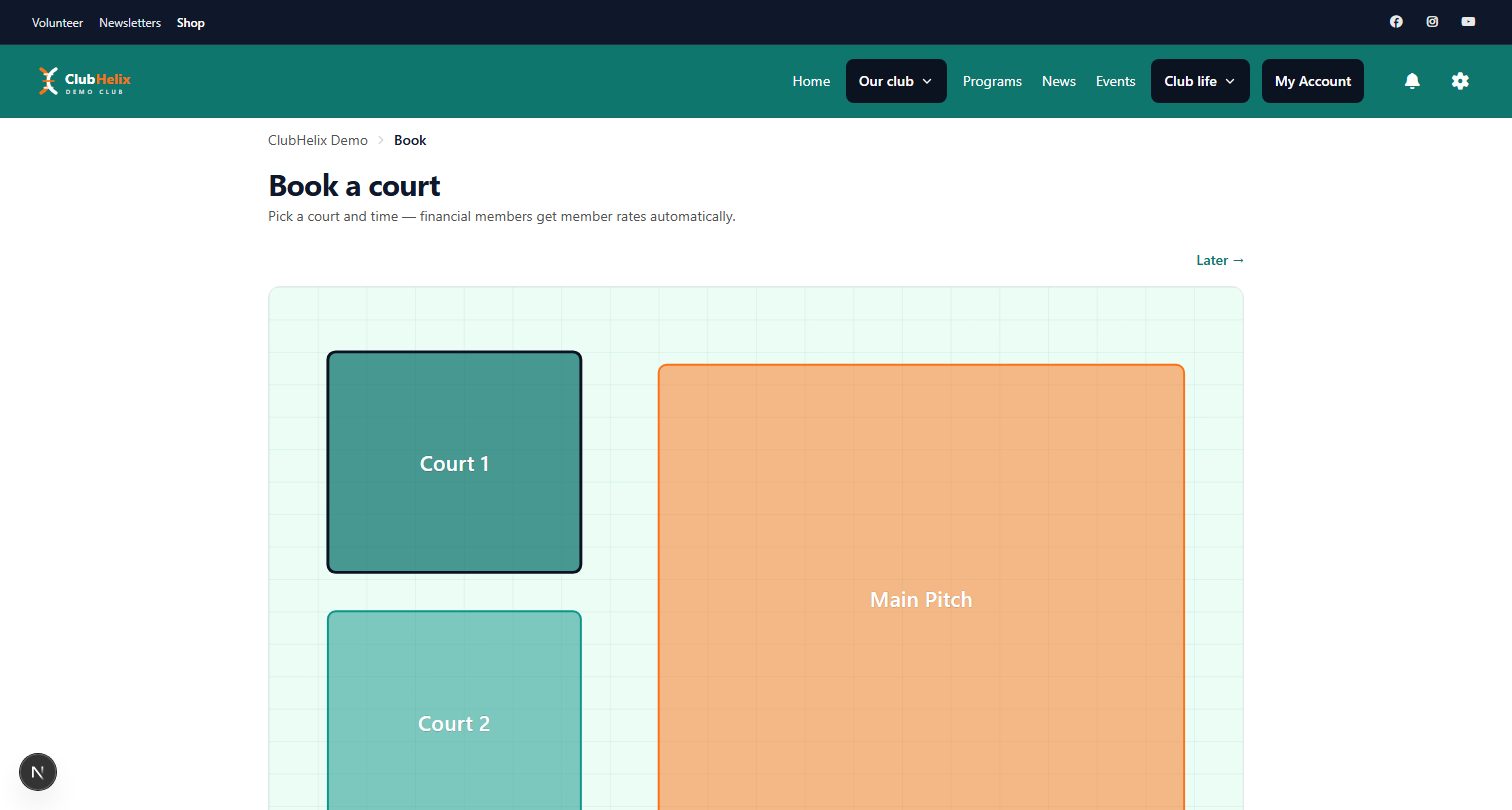
Once it's live, double bookings are impossible rather than unlikely — slot exclusivity is enforced at the database — and members cancel their own bookings, which returns the slot to the grid. The Bookings admin lists who is on which court, how many players they brought, what they paid and what is still owed at the venue, with a one-click Mark paid (cash, card at the venue, bank transfer) and a CSV export for the treasurer; reports show booked value against what was collected. The tennis solutions page shows how it fits a tennis club end to end; plans are on the pricing page and you can start on the free tier.
The rollout checklist
Switching from the diary is a communication job as much as a setup job:
- Decide the six rules as a committee and minute them.
- Set the courts up, with venue payment if no card processor is connected yet.
- Load the fixed commitments first — coaching, pennant, interclub, social nights — as admin blocks, so public bookings can never land on top of them.
- Test with three members who aren't on the committee, on their phones.
- Announce a switchover date two weeks out, run the diary in parallel for that fortnight, and put the booking link in the newsletter and on a sign by the courts.
- Retire the diary on the date — entirely, not mostly. A club that keeps both has two systems and the same double bookings.
- Review after a month — unbooked slots, casual bookings that became memberships, caps that need loosening.
Frequently asked questions
How long should a court booking slot be?
Match the slot to how the sport is played: 60 minutes for a tennis or pickleball hit, 90 for doubles, 40 or 45 minutes for squash, and 30 minutes for a coaching court. Pick one length per court and leave it alone once members have learned the rhythm of the grid.
Can a club take court bookings online without a card processor?
Yes. Set the court to be paid at the venue: the booking is confirmed straight away, the booker is told what to pay and how (a QR code, the card reader at the bar, cash), and the admin shows what is owed until it is marked paid. Many clubs start this way and switch to card payment later.
How do we stop one person booking every prime slot?
Use the rules the diary never could: a cap on slots per booking (two hours on weekends is common), an advance-booking window of about a week for members, and eligibility set to financial members on the peak courts. Longer sessions go in as admin blocks rather than public bookings.
Should members book courts for free?
Many clubs make member bookings free and charge casual visitors, which turns the booking page into a membership sales tool: a casual who books every weekend soon sees a membership paying for itself. Either price can be zero, and a lapsed member automatically sees the casual rate — the gentlest renewal reminder there is.
What stops two people booking the same court at the same time?
A real booking system refuses the second booking at the database, not in the web page, so if two members tap "book" on the same slot in the same second exactly one of them gets it. If a tool's answer to that case involves someone noticing afterwards, it is a shared calendar, not a booking system.


