
What this guide answers
- Will a scheduled post go live at exactly the time I set?
Within a few minutes of it. Schedules are checked every five minutes, so a post set for 9:00 will normally be live by 9:05.
- What happens if I publish a scheduled page by hand?
It goes live immediately and the pending schedule is cancelled, so it will not be published again later.
- Does restoring an old version delete the newer ones?
No. A restore saves the earlier content as a new version, so the version you replaced is still in the history.
- Can our volunteers see who changed a page?
Yes. The history screen shows who saved each version and when.
- Can members see scheduled pages before they go live?
No. Until its publish time a scheduled page, post or event is a draft, and drafts are not visible to visitors or members.
Ireland edition. This guide is written for volunteer-run clubs in Ireland. Where rules differ — grants, tax, incorporation, safeguarding — follow the Ireland-specific pointers below or check with your national body.
Registrations open at nine on Monday morning. The secretary starts work at eight, has a meeting at nine, and remembers the website at quarter past eleven, by which point three parents have emailed to ask whether the link is broken. Nobody did anything wrong. The club simply asked a volunteer to be in two places at once.
Scheduling fixes that. You write the update when you have the time, pick the moment it should appear, and the website does the rest. This guide covers what scheduling is good for, what it is not good for, how to plan a season of updates in one evening, and the other half of the job most clubs forget: undoing an edit that went wrong, quickly and without retyping anything.
What scheduling actually does
A scheduled update has two times attached to it.
- A go-live time. Until then the page, news post or event is a draft that visitors cannot see. At that time it is published, exactly as if someone had pressed the button.
- A take-down time (optional). At that time a live item is unpublished again. It is not deleted; it goes back to being a draft you can edit and reuse.
Both times are set in your organisation's local time, not in the time zone of whoever happens to be typing, so a committee member on holiday cannot accidentally publish the fee schedule at three in the morning. Scheduled items are checked every few minutes rather than every second, so treat a go-live time as "within a few minutes of", not "on the stroke of".
What scheduling does not do is write the content, check it, or decide whether it is still true on the day. A scheduled post goes live whether or not the committee changed its mind on Tuesday. That is why the rest of this guide is about habits as much as buttons.
What to schedule across a season
Most club websites have a predictable rhythm. The same dozen updates come round every year, and nearly all of them are known weeks in advance. These are the ones worth setting up ahead of time:
- Registration opening and closing. The registration page goes live the morning sign-ups open, and a "registrations are now closed" notice replaces it the night they close.
- Fee changes. The new season's fees go live on the date the committee agreed, not the day somebody remembered.
- AGM and special meeting notices. Many constitutions require notice a set number of days before the meeting. Schedule the notice for the first day it can go up, with a take-down time the day after the meeting.
- Come-and-try days and open days. The event goes live when you start promoting it and comes down once it has happened.
- Holiday closures. "The clubrooms are closed over the break" should appear the week before and disappear on the day you reopen.
- Sponsor announcements. A new sponsor often wants the news to land on a particular day, sometimes alongside their own. Scheduling lets you write the post early and still respect the date.
- End-of-season wrap-ups. Presentation night photos and the thank-you to volunteers can be drafted the week before and published the morning after.
And a few things you should never schedule:
- Anything urgent. A washed-out ground, a cancelled round or a safety notice goes up the moment it is known. Publish it by hand.
- Anything waiting on a decision. If the committee has not voted on the fees yet, a scheduled fee page is a guess with a timer on it.
- Results. They are known when they are known.
If your club keeps a yearly calendar, our club annual calendar template is a good place to find the dates that deserve a scheduled update.
Plan a season of updates in one evening
The biggest benefit of scheduling is that the website stops being a weekly chore and becomes a quarterly one. A practical way to do it:
- List the dates. Take the season calendar and mark every date that needs something on the website: openings, closings, meetings, events, closures.
- Write the drafts. One evening, one person, all of the pages and posts in draft. Reuse last year's where you can.
- Preview each one. Check it on a phone as well as a laptop. Most of your visitors will read it on a phone.
- Set both times. A go-live time on everything, and a take-down time on anything that goes stale: a closing date, a notice, an event.
- Tell the committee. A two-line email listing what is scheduled and when saves somebody from publishing a duplicate by hand.
- Put a check in the calendar. Ten minutes after each big go-live, somebody looks at the live site. Trust, then verify.
This is the same thinking as a club communication plan: decide the messages once, then let the calendar carry them.
The take-down time is the half everyone forgets
Stale notices do more damage than missing ones. A banner that says "registrations close Friday" is helpful for a week and actively misleading for the rest of the year. A parent who sees it in March either assumes the club is disorganised or, worse, that they have missed the season.
Setting a take-down time when you schedule the go-live costs ten seconds and removes a whole category of clean-up. It also changes the conversation at committee meetings from "who is going to remember to take that down?" to nothing at all.
A good rule: if a page or post mentions a date, it gets a take-down time.
When plans change
Scheduled updates meet real life sooner or later. Three situations come up again and again:
- You need it live now. Publish it by hand. Publishing manually cancels the pending schedule, so it will not be published a second time later.
- You need it gone now. Unpublish it by hand. That also clears the schedule, so it will not come back.
- The date moves. Edit the schedule. Nothing else needs to change.
In short, a person pressing the button always wins over the timer. That is the right way round: the schedule is a convenience, and the committee stays in charge.
Version history: the undo button every club site needs
Scheduling covers the updates you planned. Version history covers the ones that went wrong.
Every club website eventually has a bad edit. Somebody deletes the training times table while tidying the page, or pastes last year's fees over this year's, or rewrites the About page in a way the committee did not agree to. Without version history the fix is whatever somebody can remember, retyped by hand. With it, the fix is two clicks.
What good version history gives you:
- A list of saved versions with who saved each one and when.
- A comparison between any two versions, so you can see which sections were added, removed, moved or edited before you decide anything.
- A restore that brings an earlier version back.
One thing to know before you restore: restoring a page that is live puts the restored version live straight away. That is usually what you want when undoing a mistake, but it is worth reading the comparison first. Restoring a page that is still a draft keeps it a draft.
Reviews before anything goes live
Scheduling makes it easy to set something up and walk away, so it helps to have a second pair of eyes on anything important. Two habits make reviews painless:
- Leave notes on the draft. A short note pinned to the section in question ("check this date with the coach", "is this still the right sponsor logo?") tells the reviewer exactly where to look. Resolve the note once it is dealt with.
- Agree who publishes. Scheduling is publishing, later. The person who sets the schedule should be somebody the committee would trust to press Publish.
How this works in ClubHelix
In ClubHelix, pages, news posts and events all carry the same schedule control: a publish time and an optional take-down time, in your organisation's time zone (an event with its own time zone uses that). Schedules are checked every five minutes. A publish time in the past is refused rather than published immediately, so a typo in the year cannot put something live early, and a take-down time must fall after the publish time.
Anyone who can publish a kind of item can schedule it, and that permission is checked again when the schedule fires. If the person who set it has since left the committee and lost access, the item is not published on their behalf.
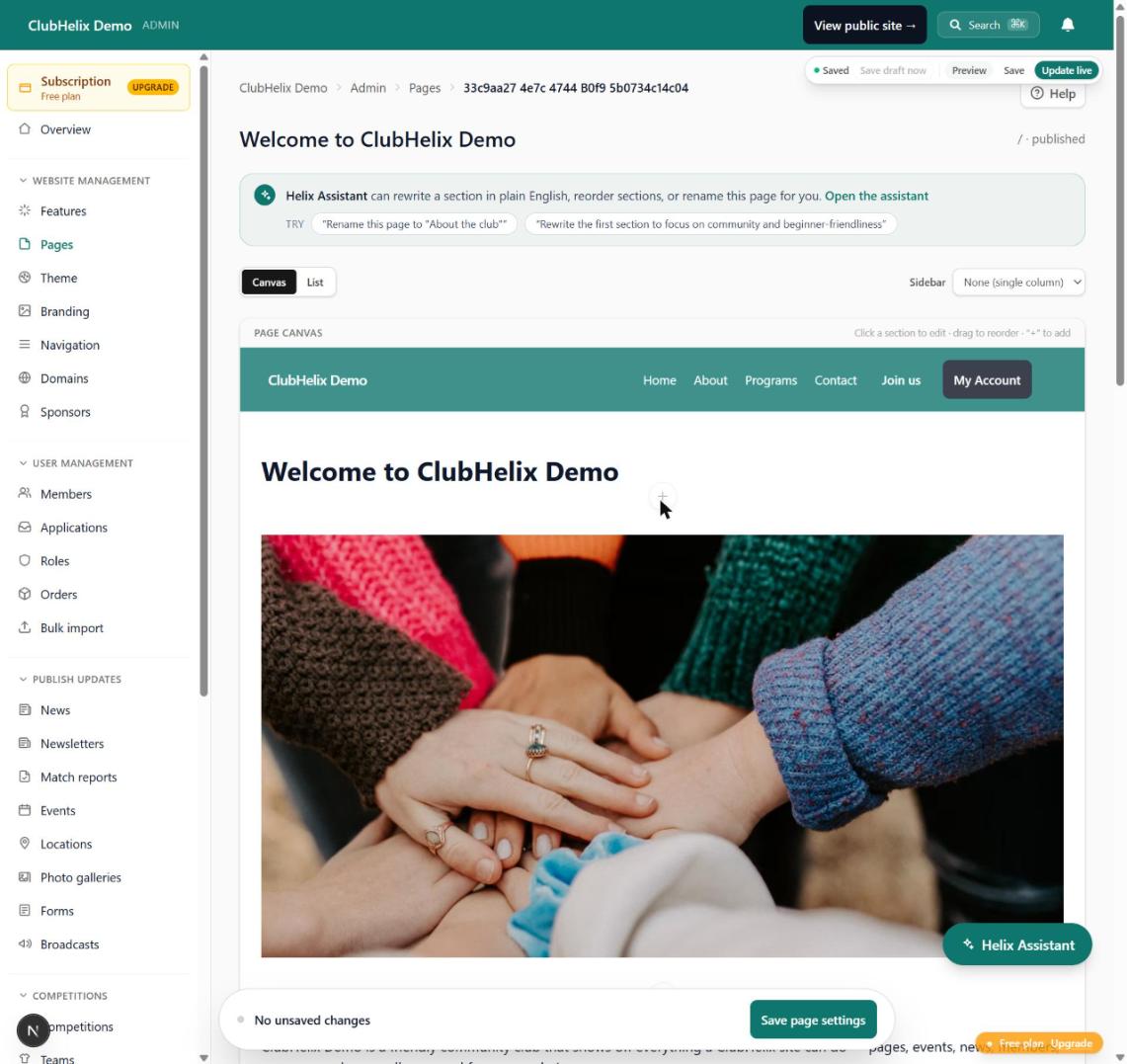
The canvas page editor keeps every saved version of a page. The history screen lists them with who saved each one, compares any two section by section, and restores whichever you choose. Themes and menus keep their own version history with a restore, so a colour change or a menu rearrangement can be rolled back too. Staff can pin notes to a section for whoever reviews the page; notes are visible to your admins and moderators, never to visitors.
Scheduling and version history are included on every plan, including Free. You can see the plans side by side on the pricing page.
Frequently asked questions
Will a scheduled post go live at exactly the time I set?
Within a few minutes of it. Schedules are checked every five minutes, so a post set for 9:00 will normally be live by 9:05. If the exact minute matters, for a sponsor announcement timed with theirs for example, set it a few minutes early.
What happens if I publish a scheduled page by hand?
It goes live immediately and the pending schedule is cancelled, so it will not be published again later. The same applies in reverse: unpublishing by hand clears a scheduled take-down.
Does restoring an old version delete the newer ones?
No. A restore saves the earlier content as a new version, so the version you replaced is still in the history. If you restore the wrong one, restore again.
Can our volunteers see who changed a page?
Yes. The history screen shows who saved each version and when. Your organisation's audit log records the change as well.
Can members see scheduled pages before they go live?
No. Until its publish time a scheduled page, post or event is a draft, and drafts are not visible to visitors or members.
Ready to stop publishing by alarm clock? Start free with ClubHelix and schedule your first update tonight.


