AI agent access
Your assistant. Your token. Our refusals.
Connect your own AI assistant to your club over the Model Context Protocol: a named, expiring, revocable token that reads only what you allow, changes only what you tick, and can never send a member a single email.
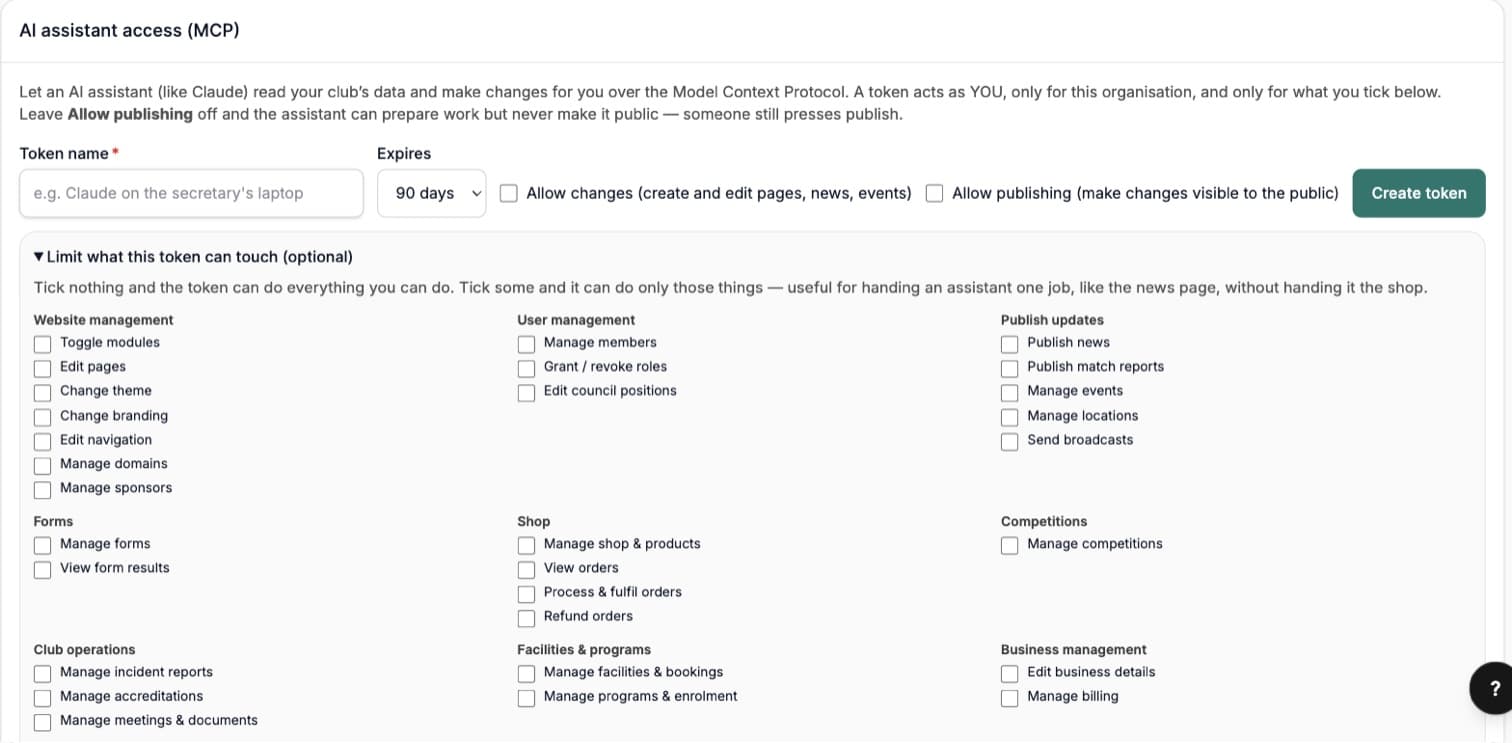
The other AI features on this list are ours, working inside the admin. This one is yours: bring the assistant your committee already uses, hand it a key you cut yourself, and let it do the reading and the drafting. The key is named, expiring and revocable, and the platform checks every single thing the assistant asks for against what the person who made the key is actually allowed to do — this second, not when the key was cut.
Connect
One line, and your assistant can see the club
On any plan, open System → API & webhooks and find AI assistant access (MCP). Name the token after where it will live, pick how long it lasts, tick what it may do, and press Create token. The page then shows you the single line that connects it — the same one whether your assistant runs in a terminal, a desktop app or a connector screen.
The token is shown exactly once and only a fingerprint is kept, the same rule as any API key. It carries no password, cannot be used to sign in, and opens nothing but the connection.
- Expires in 30 days, 90 days, a year — or never, if you really mean it (90 days is the default)
- An open standard, so you are not tied to one assistant or one vendor
- Revoke it and the connection dies everywhere, instantly — mid-conversation if need be
Three scopes
Two tick boxes decide how far it goes
Most platforms give an integration one switch: on, or off. Here the decision is split where it actually matters to a club — at the moment something becomes public.
- Both boxes off — read. It answers questions. Members, money, events, fixtures, forms, facilities, programs and your own audit log, across more than seventy read tools. Nothing changes.
- Allow changes. It creates and edits pages, news posts and events — but it cannot publish or unpublish, so it can never put something new on your site or take something off it. On your website’s pages even a live edit is refused and handed back as a draft.
- Allow publishing. It can make that work public, and take it down again. The one scope worth a committee conversation.
Narrowing
Hand it one job, not the keys to everything
Under Limit what this token can touch, tick the parts of the club a token may reach and it can reach nothing else — the news page without the shop, the fixtures without the member roster. Leave it blank and the token can do whatever its owner can do.
The rule underneath is the one that makes this safe to trust: narrowing is an intersection, never an addition. A token is always the smaller of what you ticked and what its owner is allowed to do today — so it can only ever take capability away, and a token can never be used to grant someone a permission they do not have.
The refusals
What it cannot do is the product
An assistant is only as safe as the things the platform will not let it do — so these are built in, not configured, and they are checked on every request rather than trusted from the moment the token was made.
- It cannot send. There are more than 200 tools on the endpoint and not one of them sends an email or an SMS, takes a payment or issues a refund. An assistant allowed to publish a page still cannot mail a single member — it drafts into your broadcasts composer and stops.
- It cannot reach another club. A token is pinned to your organisation. Ask about anyone else and the request is refused by the application, and beneath that by the same database security that separates every club on the platform.
- It cannot outrank its owner. Requests run as the admin who made the token, under exactly their permissions, re-checked every time. Demote them and the connection stops working — mid-conversation, not at the next renewal.
- It cannot act by surprise. Every change is dry-run first: the assistant has to show you the plan and be told to go ahead before anything is written.
- It cannot flood you. 120 requests a minute, per token.
- It cannot cover its tracks. Reads and changes land in your audit log under the real person’s name and the token used.
Worth knowing
The parts a careful committee should ask about
Member-facing tools return aggregates — counts by status and payment standing — rather than names, addresses or medical details, so the everyday questions get answered without a roster leaving the building.
And one thing worth saying plainly, because someone on your committee will ask: like any API token, an MCP token does not go through the second-factor prompt a person gets in the browser. That is precisely why it expires by default, why only a full admin can create one, why it can be revoked in a click, and why every action it takes has a name against it.


See it with your club's name on it
Spin up a fully-branded site in under 30 minutes, free — no technical skills needed.