
What this guide answers
- How long does it take to build a club website?
With a club platform and this guide's checklist, a working site — homepage, join page with live registration, fixtures, contact — is an afternoon's work, and most of that is gathering photos, fee tables and committee…
- Can we build a club website for free?
Yes — free tiers on club platforms and free generic builders both exist, and for a brand-new club a free tier is a sensible start.
- What should a small club put on its website first?
In priority order: what/where/who on the homepage, a join page with fees and a real registration form, this season's fixtures or training times, venue addresses with maps, and a contact page with role-based emails.
- Do we really need a custom domain?
You'll survive without one, but it's the cheapest credibility upgrade available.
- Who should own the club website?
The club, legally and practically: domain in the club's name, platform account tied to a role-based email, and at least two current committee members holding admin access at all times.
South Africa edition. This guide is written for volunteer-run clubs in South Africa. Where rules differ — grants, tax, incorporation, safeguarding — follow the South Africa-specific pointers below or check with your national body.
Your club's website is the first thing a prospective member sees, the place parents check for wet-weather calls, and the front door for sponsors deciding whether you look organised enough to back. Yet most club websites are built once by a volunteer with some spare time, then slowly go stale until nobody remembers the login.
This guide walks through the whole job, end to end: deciding what your website is for, choosing how to build it, the exact pages to include, getting a proper domain and club email, and — the part most guides skip — how to keep it alive season after season with a committee of volunteers. Work through it in order and you can go from nothing to a genuinely useful club website in an afternoon.
Start with the three jobs your website must do
Before you touch any software, agree with your committee on what the website is actually for. Almost every community club website has the same three jobs, in this order:
- Convert interest into members. Someone hears about the club, searches for it, lands on your site, and needs to see — within seconds — what you offer, where you play, what it costs, and a big obvious "join" button.
- Answer the questions members already ask. Training times, fixtures, venue addresses, uniform orders, fees, who to contact. Every question answered on the site is a message your secretary doesn't have to answer at 9pm.
- Look credible to sponsors, councils and grant assessors. A tidy, current website with sponsor logos, photos and clear contact details is quietly doing sales work for your club all year.
Write those three jobs down. Every page you build should serve at least one of them; anything that serves none of them ("Our webmaster's blog", the 2019 photo archive nobody curates) is clutter you'll be maintaining forever.
Choose how you'll build it
There are really three routes for a community club, and the right one depends on your volunteers, not your budget.
A generic website builder. Drag-and-drop page builders can produce a pretty homepage, but everything a club actually needs — member registration, fee collection, fixtures, team pages, member-only content — has to be bolted on with third-party forms and payment links. The result is a patchwork the next volunteer can't maintain.
Custom-built by an agency or a member who codes. Beautiful until the person who built it moves on. Clubs routinely end up locked out of their own website because the hosting was in a former member's personal account. If you go this route, insist the club owns the domain, the hosting account and every login.
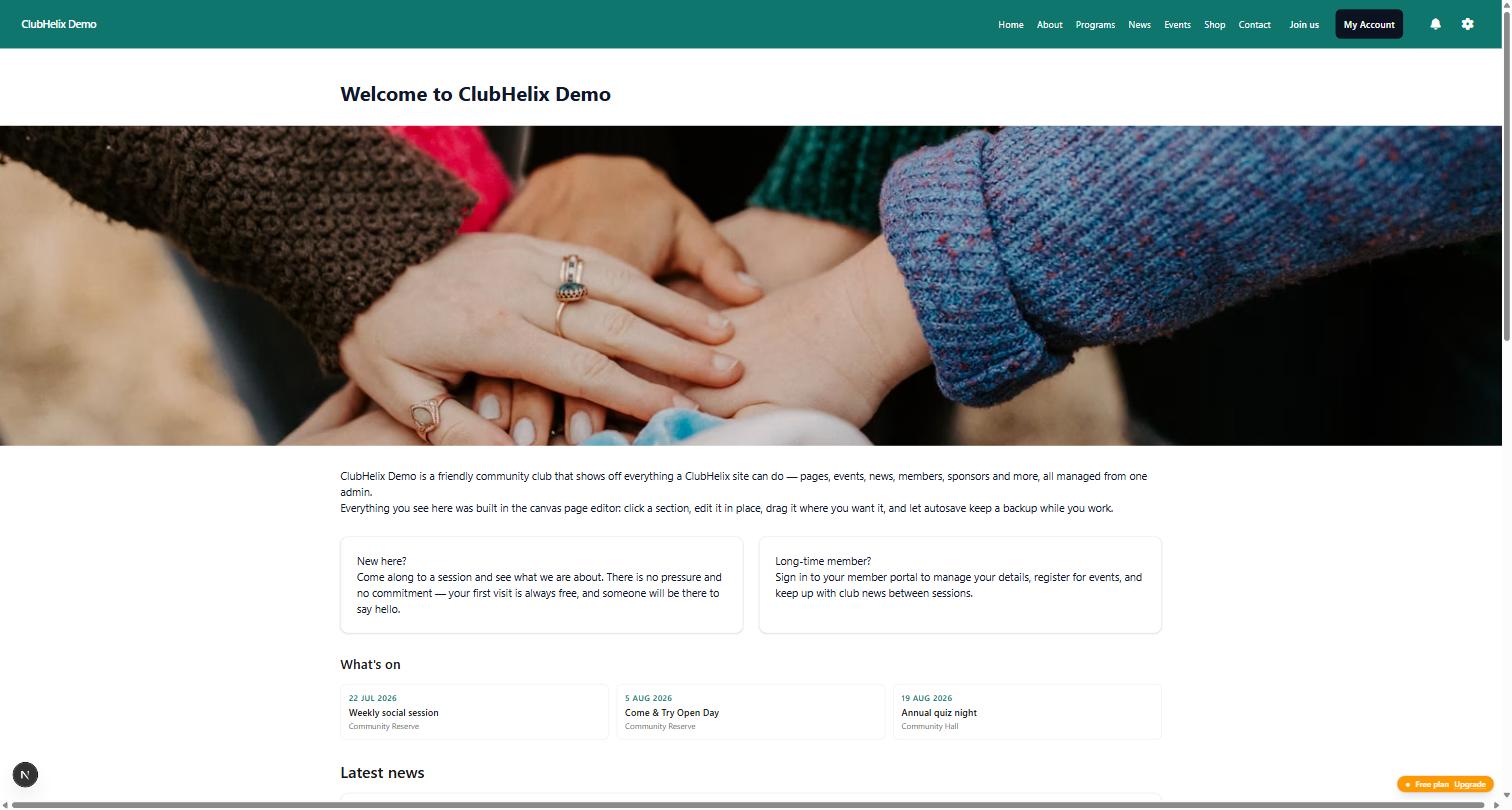
A club platform. Purpose-built systems (like ClubHelix) bundle the website with the club admin behind it — registration forms feed the member database, fixtures publish themselves to the site, and payments land in the club account with receipts issued automatically. You trade a little visual freedom for a system any committee member can run.
For most volunteer-run clubs, the platform route wins on the only metric that matters long-term: whether the website is still accurate in three seasons. The honest test: if your most tech-savvy volunteer quit tomorrow, could the treasurer update the homepage? If the answer is no, you're building a liability.
What a club website builder is — and how it differs from a general one
"Club website builder" gets used for two genuinely different products, and picking the wrong one is the most common expensive mistake in this whole process.
A general website builder is a page-design tool. It gives you templates, a drag-and-drop canvas and hosting, and it is very good at producing an attractive set of pages. What it does not have is any concept of a club: no member record, no registration that populates a database, no fees tied to a person, no fixtures, no team pages, no committee roles. Every one of those has to be added as a third-party embed, each with its own account, its own bill and its own login that eventually goes stale.
A club website builder starts from the club and renders the website as one of its outputs. The member registration form is not a form — it is the front door to the member database. The fixture list is not a table someone types up — it is the competition the club is actually playing. The sponsor logos are not images — they are sponsorship agreements with renewal dates.
The practical difference shows up in maintenance, not in the launch:
| Job | General website builder | Club website builder |
|---|---|---|
| New member joins | Form emails the secretary, who retypes it into a spreadsheet | Member record created, fee taken, receipt sent |
| Fixture changes | Someone edits the page — or forgets | Changes once, appears everywhere including calendar feeds |
| Collecting fees | Third-party payment link, reconciled by hand | Tied to the member, reconciled automatically |
| Committee handover | Whoever knows the logins | Roles reassigned; nothing leaves with the outgoing person |
| Cost in year two | Builder + forms + payments + email, separately | One subscription |
Neither is "better" in the abstract. If your club genuinely needs five static pages and collects fees at training in cash, a general builder is simpler and probably cheaper. The moment you want people to join and pay online without a volunteer retyping anything, the general builder starts accumulating bolt-ons and the maths inverts.
If you want to see what the club-platform version looks like before deciding, the template gallery shows finished club sites, and the live demo is a real club site with the admin behind it that you can click through without signing up.
The club website checklist: pages you actually need
Here is the page structure that works for almost every sports club. Steal it as-is.
| Page | What it must include | Job it serves |
|---|---|---|
| Home | What/where/who in one screen, next fixtures or events, join CTA, sponsor strip | Convert + credibility |
| Join / Membership | Fees for every category, what's included, online registration form | Convert |
| Fixtures & results | Current season draw, results, ladder | Answer questions |
| Teams | Each team, training times, coach contact | Answer questions |
| Where we play | Every venue with a map, parking notes | Answer questions |
| News | Match reports, announcements — dated, so freshness is visible | Credibility |
| Events | Registration days, presentation night, fundraisers, with RSVP or tickets | Convert + answer |
| Shop (if you sell) | Uniforms and merch with sizes, online payment, pickup notes | Answer questions |
| Sponsors | Logo, link and a sentence for every sponsor tier | Credibility |
| Contact & committee | Role-based emails (secretary@…), not personal Gmail addresses | Credibility |
Notes on the ones clubs get wrong:
- Membership pricing belongs on the public site. Hiding fees behind "contact us for pricing" costs you junior sign-ups every January. Parents comparison-shop clubs the way they shop anything else.
- The join form should be a real registration, not a "we'll get back to you" enquiry form. Every manual step between interest and paid membership loses people. A proper self-registration flow takes payment, collects medical details and consent, and creates the member record in one pass.
- "Where we play" is your most-visited page in winter. Every venue needs an address that opens in the visitor's maps app, not a PDF of written directions.
Structure, navigation and the mobile test
Keep the menu to six or seven items maximum, and label them with the words members use — "Join", "Fixtures", "Teams", not "Get involved" or "Our programs". Everything else goes in the footer.
Then apply the mobile test, because well over half of your traffic will be phones: can a parent standing at training, holding a toddler, find this weekend's fixture time in under ten seconds? Can they tap the venue name and get directions? Can they pay the registration fee without pinch-zooming a desktop form? If your builder makes you design desktop and mobile separately, you'll maintain neither. Use a system where every page is responsive by default.
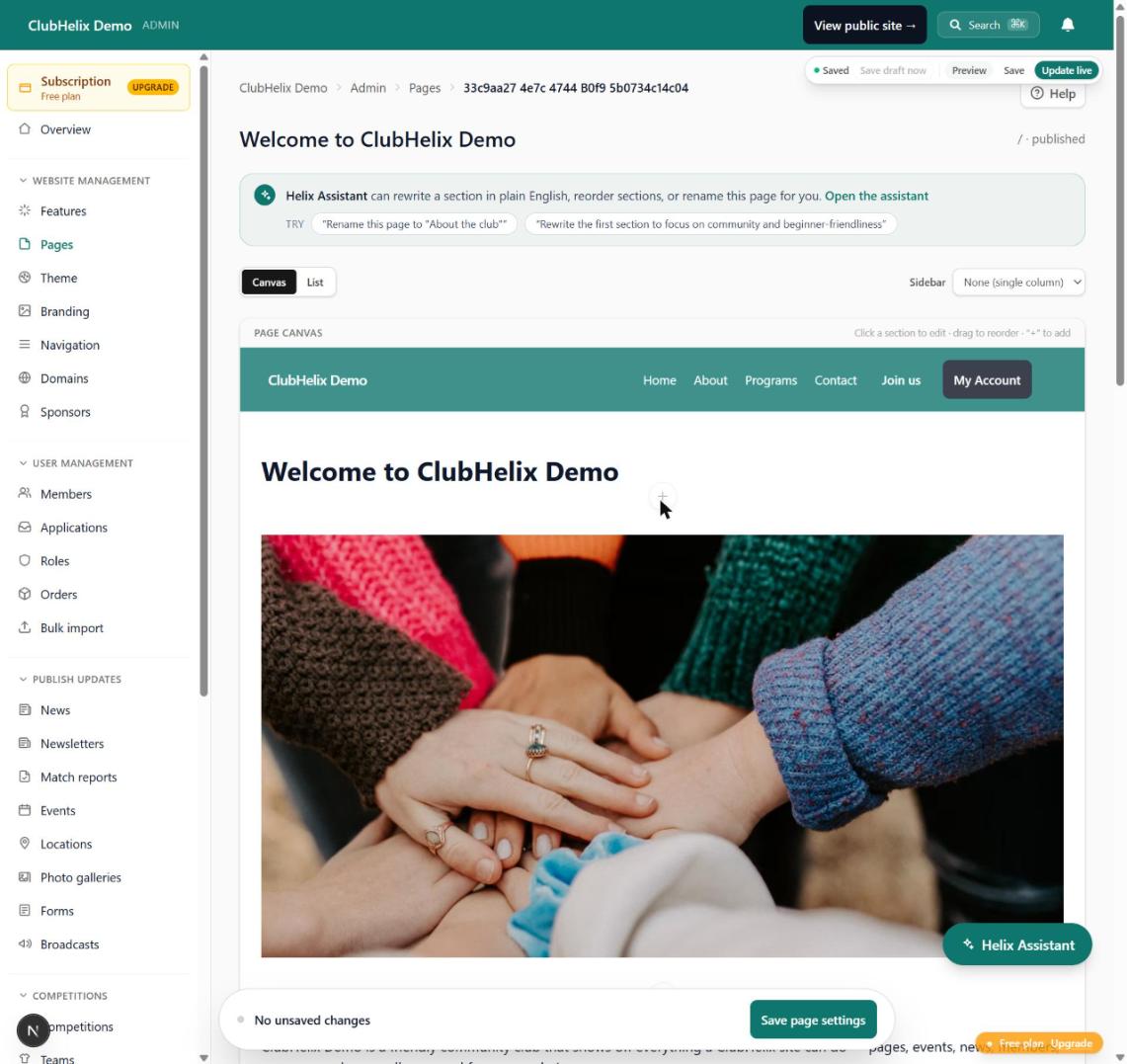
Within each page, put the page's own story in the main column and the next steps (upcoming events, contact details, a join button, training times) in a sidebar beside it. On a phone the sidebar moves below the page, so the story still comes first. Our guide to laying out a club website page has ready-made layouts for the home, membership, training, committee and contact pages.
Branding: look like your club, not like a template
You don't need a designer — you need consistency. Three decisions, made once:
- Colours. Your club colours as the site palette, applied everywhere automatically — buttons, headings, links. A theme system beats hand-colouring every page, because the next volunteer can't break it.
- Logo. One clean version on a transparent background. If your logo is a 400-pixel JPEG from 2009, getting it redrawn costs less than a set of match balls and upgrades everything it touches.
- Photos. Real photos of your club beat stock photography every time. Set up a shared folder, ask two parents with good phones to be unofficial club photographers, and refresh the homepage images each season. (Get photo consent sorted at registration time — one tick-box, not a yearly scramble.)
Fonts come next. Pick two, one for headings and one for body text, from fonts your site serves itself, not a font name that only shows on computers where it happens to be installed. Our guide to club website fonts and branding suggests pairings that suit a club and covers when your club's own font is worth uploading.
Get a proper domain and club email
A custom domain — yourclubname.org.au or .com.au — costs about as much per year as one club polo shirt and does three things: it looks legitimate on a sponsor proposal, it's easy to read out over the phone, and it means your web address survives any future platform change.
Two rules that save future committees real pain:
- The club must own the domain. Register it in the club's name with the club's details, paid from the club account — never a volunteer's personal account. "The old treasurer owns our domain and isn't returning emails" is one of the most common, most avoidable club-admin disasters.
- Set up role-based email on the same domain.
secretary@yourclub.org.auforwards to whoever holds the role this year. Committee handover becomes an email-forwarding change, not a note asking members to update their address books. A platform with custom domain support will connect the domain to your site with a couple of DNS records, and modern registrars make that a ten-minute job.
What a club website costs (honestly)
Rough annual numbers so your committee can budget properly:
Figures are in rand. Almost all of these products bill in US dollars, so budget a buffer for exchange-rate movement and bank conversion fees.
- Domain name: $15–$40 per year depending on the ending (.org.au is usually cheapest and reads as the non-profit you are).
- DIY generic builder: $200–$500 per year once you add forms, e-commerce and email tools — plus the hidden cost of a volunteer stitching them together.
- Club platform: free tiers exist for small clubs; paid plans typically land between a few hundred and around a thousand dollars a year depending on club size and features, with payments, registration and email included. See pricing for how ClubHelix structures it.
- Agency build: $2,000–$10,000 up front, plus hosting, plus an hourly rate every time you need a change. Rarely the right call for a volunteer club.
Whatever you choose, the real cost of a club website is volunteer hours. A slightly dearer system your whole committee can edit is cheaper than a free one only one person understands.
Keep it alive: the maintenance routine
A club website is a habit, not a project. The clubs whose sites stay current do three small things:
- Assign the role. Someone on the committee owns the website the way someone owns the canteen. It's a named responsibility, handed over with everything else at the AGM.
- Automate what can be automated. Fixtures, results, ladders, event RSVPs and member records should update the website as a side-effect of running the club, not as a separate publishing chore. This is the single biggest argument for an integrated platform over a standalone site.
- Adopt a season rhythm. Pre-season: update fees, registration dates, committee contacts, sponsor logos. Mid-season: news and results (delegate match reports to team managers). Post-season: presentation night photos, thank-you to sponsors, and a "registrations for next season open soon" banner. Write each season's updates in one sitting and schedule them to go live on the right day, with a take-down time on anything that mentions a date.
Put those three in your committee handover document and your website will still be accurate when the current committee has all moved on.
Common mistakes to avoid
- Building the site around this year's committee. Personal email addresses, a member's personal hosting account, logins nobody wrote down. Institutionalise everything from day one.
- Launching with placeholder pages. "Coming soon" pages read as neglect. Launch with fewer, finished pages and add more later.
- Ignoring search. Put your suburb and sport in your homepage title and text ("Northside Hockey Club — junior and senior hockey in Brisbane's north"). Most of your future members will find you through a local search.
- Forgetting the boring legal pages. A privacy note about how you handle member data, photo consent, and clear contact details. Grant applications and school partnerships increasingly check for these.
- No analytics at all. Even a glance at monthly visits tells you whether registration campaigns are working and which pages members actually use.
Frequently asked questions
How long does it take to build a club website?
With a club platform and this guide's checklist, a working site — homepage, join page with live registration, fixtures, contact — is an afternoon's work, and most of that is gathering photos, fee tables and committee details. Agency builds typically run six to twelve weeks. Plan to launch a good site quickly rather than a perfect site never.
Can we build a club website for free?
Yes — free tiers on club platforms and free generic builders both exist, and for a brand-new club a free tier is a sensible start. The trade-offs are usually platform branding on your site, limits on members or pages, and fewer admin features. The domain name (roughly $15–$40 a year) is the one cost worth paying from day one, because it keeps your address portable forever.
What should a small club put on its website first?
In priority order: what/where/who on the homepage, a join page with fees and a real registration form, this season's fixtures or training times, venue addresses with maps, and a contact page with role-based emails. That covers the overwhelming majority of what visitors come for; news, galleries and history pages can follow.
Do we really need a custom domain?
You'll survive without one, but it's the cheapest credibility upgrade available. It also protects you: if you ever change platforms, your address, your printed materials and your QR codes all keep working. Register it in the club's name and renew it from the club account.
Who should own the club website?
The club, legally and practically: domain in the club's name, platform account tied to a role-based email, and at least two current committee members holding admin access at all times. Review access every AGM alongside the bank signatories — it's the same category of risk.
Ready to put this into practice? ClubHelix gives your club a full website with drag-and-drop page editing, your own domain, and online registration built in — start free and have the essentials live today.
