
What this guide answers
- What camera do we need to stream club matches?
Most likely one you already own. A phone, an action camera or a fixed camera bought for coaching analysis will all push a stream to a platform, and that is the only capability that matters.
- Can we embed a Facebook Live stream on our club website?
Not on the ClubHelix match centre — it embeds YouTube, Twitch and Vimeo, and a social-feed stream is not on that list.
- Do we need fast internet at the ground?
You need enough upload speed, which is a different number from the download speed people quote.
- Is it legal to stream junior sport?
It is not a simple yes or no, and it is a decision for the committee rather than for whoever is holding the camera.
- Where does the stream actually appear on our site?
On the fixture's page in the match centre, beside the score and the lineups, once an administrator pastes the link into the fixture's live stream field.
Canada edition. This guide is written for volunteer-run clubs in Canada. Where rules differ — grants, tax, incorporation, safeguarding — follow the Canada-specific pointers below or check with your national body.
There is a conversation that happens in club committee rooms every season. Someone proposes streaming home games. Someone else quotes a camera system with a subscription attached. The number gets read out, the room goes quiet, and the idea is deferred to next year for the fourth time.
The quiet part is that the club usually already owns something that can do it. A phone can stream. An action camera can stream. The fixed camera the club bought for coaching analysis very likely can stream. What has been missing is not equipment — it is the five minutes of explanation about how a camera gets a picture onto the internet, and what happens to that picture once it is there.
This guide is that explanation. For the wider setup advice — tripods, commentary, weather, the run sheet — our how to livestream local sport guide covers the ground properly. This one is about using what you have, and about where to point it so the stream ends up on your own club site rather than lost in somebody's feed.
The one concept that makes the rest obvious
Nearly every streaming camera in the world works the same way: it pushes video to a destination, and the destination gives the world a link.
The camera (or the app, or the laptop) does not serve video to your members directly. It sends a single outgoing stream to a platform — typically using a protocol called RTMP, which is why camera manuals and vendor comparison charts talk about "RTMP output" as though everyone knows what it means. The platform takes that one stream, does the hard work of delivering it to however many people are watching, and publishes a page at a URL.
That matters for two reasons:
- Your camera does not need to be special, it needs a destination. Any device that can push to YouTube, Twitch or Vimeo is a streaming camera as far as your club is concerned.
- Switching destinations later is easy. The destination is a stream key you paste into the camera or app. Nothing about the camera changes.
Once that clicks, the shopping question changes from "what streaming system should we buy" to "what do we already own that can push a stream, and where should it push?"
Five things you probably already have
A phone. The cheapest working setup in club sport. The platform's own app streams straight from the camera, and the only real accessories are something to hold it steady and a way to keep it charged for two hours. Its weaknesses are known: limited zoom, and audio that picks up whoever is standing nearest.
An action camera. The little waterproof one somebody bought for a holiday. Most recent ones stream through their own app, using a phone as the network connection, and they are far more robust on a fence post in bad weather than a phone is.
A mirrorless or DSLR camera. If the club has one for photos, it can usually become a serious-looking stream with a capture device and a laptop. More cables, better picture, and worth it only if somebody enjoys the setup — this is the option that dies when its one enthusiast moves clubs.
A fixed or pan-tilt-zoom camera the club already bought. Plenty of clubs own one for coaching review or ground security and have never used its streaming output. Check its manual for RTMP or "live streaming" settings before buying anything at all. This is the single most common piece of already-owned streaming kit in community sport.
A dedicated sports camera system. Several vendors sell auto-tracking cameras aimed at grassroots clubs, and the majority of them do exactly what everything above does: push a stream to a platform of your choosing. If your club has one, or shares a ground with a club that does, you are already past the hard part.
Where to point it — and the honest limitation
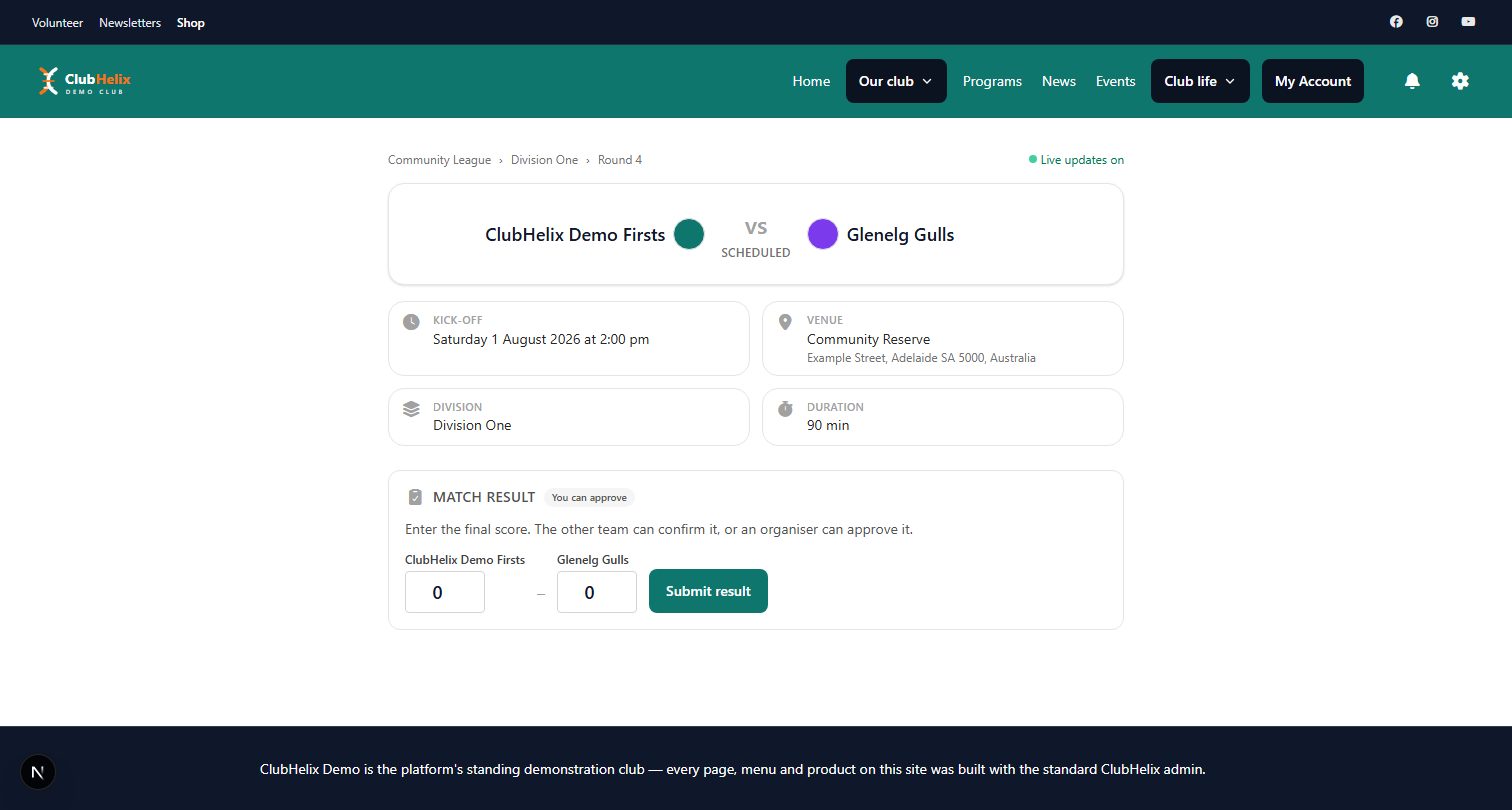
Once the stream has to end up on your club's own match page, the destination choice narrows to what a website can embed safely. In ClubHelix, a fixture's match card takes the link you are already streaming to and puts the player on the public match centre page beside the score and the lineups.
It embeds YouTube, Twitch and Vimeo. Paste the link, save, and the player appears. Leave it empty and it disappears again. Stream embeds are part of the Pro plan.
It does not embed a Facebook stream. That is worth saying plainly, because it is the destination plenty of clubs reach for first. A stream published to a social feed can be linked to, and it can be shared in a post — but it cannot be rendered inside your own match page, so the person watching leaves your site, needs an account, and lands in a feed designed to send them somewhere else afterwards.
The practical answer for most clubs: stream to YouTube, then share that link everywhere you already talk to people. The same video lands on your match page, in your newsletter, in the team chat and on whatever social accounts the club keeps, and the club owns the destination rather than renting it.
If your audience genuinely lives on one social platform, you have two honest options: accept the extra step of posting a link, or run the stream in both places using software that pushes to multiple destinations. Doing that well requires a laptop and a person, which brings us back to the volunteer question rather than the technology one.
Getting the picture right with what you own
You do not need more gear. You need four decisions.
Height and position. Halfway line, as high as the ground allows, behind a fence rather than in front of one. A camera at head height in the crowd produces a stream of the backs of heads. Most grounds have a stand, a clubroom balcony or a storage shed roof that solves this permanently.
Framing. Wide enough that the play never leaves the frame, close enough that players are recognisable. Set it once, mark the tripod position on the ground with tape, and stop adjusting it mid-match — constant zooming is far more unwatchable than a fixed wide shot.
Sound. Wind is the main enemy. A cheap foam cover over the microphone does more for a stream than any camera upgrade, and pointing the camera so it has the ground behind it rather than the open side helps more than people expect.
Power and connection. A two-hour stream flattens a phone. A power bank, a long cable and a plan for the network — the ground's internet if it is decent, a phone hotspot if it is not — are the difference between a stream and a story about a stream that stopped at half time. Test your upload speed at the ground on a Saturday, not at the clubhouse on a Tuesday.

Permissions come before equipment
Streaming junior sport involves children who did not choose to be broadcast, and a club that skips this step will eventually have a very bad afternoon. Decide before the first stream: who is told, how consent is recorded, how a family opts out, and what happens to the recording afterwards.
The livestream local sport guide covers this in detail, along with the practical measures — signage at the ground, an opt-out that does not require an argument, and a rule about not streaming training sessions. Get it settled at a committee meeting and minute it. It is the part of streaming that is genuinely about governance rather than gear.
Make the stream do more than one job
A stream is worth far more than the ninety minutes it runs for, and clubs routinely throw the rest away.
- Leave the recording up. A parent on a shift, a grandparent overseas and an injured player all watch later. The same link keeps working.
- Pair it with the match report. A match report with the replay embedded above it is the most-read page a club website produces all season.
- Use it for selection and coaching, which is what justifies the fixed camera at budget time.
- Show it to sponsors. A sponsor board in shot for two hours, with a view count attached, is the easiest sponsorship conversation a club will have.
- Cut highlights. Thirty seconds of a good goal, posted on Monday, does more for membership than any amount of recruitment copy.
And once a club has a season of streams, fixtures, results and reports living in one place, the whole competitions side of the site starts pulling its weight: the fixture people came for carries the score, the stream, the lineup and the report, rather than being a date in a list.
A first-stream checklist
- Decide the destination and create the club account. One account, in the club's name, with the login in the club's password store — not a volunteer's personal account.
- Confirm the camera can push to it, using the manual or the platform's app.
- Test at the ground, at the time of day you will actually stream.
- Check upload speed and have a hotspot fallback.
- Sort permission and signage.
- Set the stream to unlisted for the first run, so a bad test is not a public event.
- Paste the link on the fixture so the player appears on the match page.
- Tell people it is happening, twice: earlier in the week and on the morning.
- Nominate someone to start it who is not also coaching, scoring or running the canteen.
- Review it on Monday: framing, sound, drop-outs, and one thing to change next week.
Frequently asked questions
What camera do we need to stream club matches?
Most likely one you already own. A phone, an action camera or a fixed camera bought for coaching analysis will all push a stream to a platform, and that is the only capability that matters. Check what the club already has and whether it supports streaming or RTMP output before spending anything — the money is far better spent on a stable mount, a power solution and a wind cover for the microphone.
Can we embed a Facebook Live stream on our club website?
Not on the ClubHelix match centre — it embeds YouTube, Twitch and Vimeo, and a social-feed stream is not on that list. The straightforward approach is to stream to YouTube, paste that link on the fixture so the player appears on your match page, and then share the same link on social. The people who watch on social still watch, and the club keeps a page of its own that works next season.
Do we need fast internet at the ground?
You need enough upload speed, which is a different number from the download speed people quote. A single stream at a sensible quality is modest by modern standards, but ground internet is often shared with everything else happening on a Saturday. Test at the ground on a match day, keep a phone hotspot as the fallback, and drop the streaming quality a notch rather than risking constant buffering — a steady, slightly softer picture is far more watchable than a sharp one that stalls.
Is it legal to stream junior sport?
It is not a simple yes or no, and it is a decision for the committee rather than for whoever is holding the camera. Consent, opt-outs, signage, what happens to the recording and your governing body's own rules all come into it. Settle the policy before the first stream and record the decision in the minutes — our livestream local sport guide walks through what that policy needs to cover.
Where does the stream actually appear on our site?
On the fixture's page in the match centre, beside the score and the lineups, once an administrator pastes the link into the fixture's live stream field. Clearing the field removes the player again. Because it lives on the fixture rather than in a news post, the same page carries the build-up, the live score, the stream and afterwards the result and the report.
Put the stream beside the score on every fixture with the ClubHelix live match centre. Next: how to livestream local sport and how to write a match report.


