
What this guide answers
- What's the cheapest livestream setup for a club?
A phone on a tripod, shot landscape from somewhere high near halfway, with a power bank cabled in and a pre-game test stream — realistically just a tripod and a power bank beyond the phone.
- How much internet data does livestreaming a match use?
5 GB of upload per hour, so a full match with warm-up runs 2–4 GB; 1080p can double that.
- Do we need permission to livestream junior sport?
Treat it as yes, three times over: your association or league's streaming rules, the venue's filming policy, and — most importantly — media consent from families, best collected as part of online registration.
- How do we put the livestream on our club website?
Stream to a platform that provides an embed code (the major ones all do), then embed that player in a permanent "watch live" or match centre page on your site, so the location never changes week to week.
Canada edition. This guide is written for volunteer-run clubs in Canada. Where rules differ — grants, tax, incorporation, safeguarding — follow the Canada-specific pointers below or check with your national body.
Ten years ago, livestreaming a local game meant a broadcast van. Today the grandparents on the other side of the country, the injured captain on the couch and the parent stuck at work can all watch the under-16s final — filmed on a phone that's already in someone's pocket, streamed for nothing, and embedded on the club website next to the live score.
The catch is that "just point a phone at it" produces streams nobody can bear to watch: vertical video of distant ants, wind roar, and a battery that dies mid-match. The gap between unwatchable and genuinely good is small, cheap and mostly about knowing a dozen practical tricks. This guide covers the setups (from free to club-serious), the platform choice, commentary and scoreboard extras, the legal bits, and how to put the stream where it belongs — on your own club website.
Before anything: permission and privacy
Three checks before your first broadcast:
- Your competition's rules. Some associations and leagues restrict or license streaming of their fixtures (especially finals). One email to the association saves an awkward takedown later.
- The venue. Public grounds are usually fine; some stadiums and school venues have filming policies.
- The people. For junior sport especially, follow your club's and association's photography/filming policies — collect media consent at registration (a tick-box in your online sign-up flow, not a yearly paper chase), announce streaming in the pre-game communication, and have a process for families who opt out. Stream wide game coverage rather than lingering close-ups of individual children, and never publish full names of juniors alongside footage without consent.
The practical rulebook is your provincial sport organisation's photography and filming policy — most publish one as part of their safe-sport commitments — and school venues need the school's permission on top of that.
None of this is hard; all of it is easier before the season than mid-controversy.
Setup 1 — The no-budget starter: a phone and something to hold it
A modern phone shoots better video than broadcast cameras from the 2000s. The difference between awful and watchable phone streaming is entirely technique:
- Landscape. Always. Vertical sports streams are unwatchable. Lock rotation before you hit go.
- Get high. Two metres of extra height transforms sports video. Film from the clubroom balcony, the top of the small grandstand, the tray of a parked truck — anywhere elevated near halfway. If all else fails, a tall tripod fully extended beats eye level.
- Stabilise. Any tripod with a phone mount. Handheld streams induce seasickness within minutes.
- Frame wide, pan lazily. Amateur camera operators chase the ball like a spectator; good ones frame a third of the field and move smoothly and rarely. When in doubt, wider.
- Kill the zoom. Digital zoom murders quality on stream. Position closer instead.
- Power and data. A charged power bank cabled in from kick-off (streaming drains 20–30% per hour), and either solid venue Wi-Fi or a phone plan with genuine headroom — a two-hour 720p stream eats roughly 1.5–3 GB of upload.
- Do a dry run at training. Stream ten minutes privately, then watch it back. You'll fix three things immediately.
Total cost: a cheap tripod and a power bank. This setup, done with discipline, is better than what most clubs stream today.
Setup 2 — The mid-budget club kit
When the streams get an audience, the upgrades that matter most, in order:
- A taller, sturdier tripod — height and wind resistance are worth more than any camera upgrade.
- Audio — wind is the number-one complaint about outdoor streams. A phone-compatible shotgun or lapel mic with a foam/furry windshield makes the stream feel produced. If you add commentary later, commentators need their own mics.
- A second phone or an action camera behind the goals for replays/highlights (edit later; multi-camera live switching is a rabbit hole — see below).
- A streaming app with overlays — several popular sports-streaming phone apps add a live scorebug, team names and sponsor logos over your phone footage and push the result to your platform of choice. The scorebug alone doubles perceived quality, and a "stream brought to you by [sponsor]" overlay is a genuinely sellable asset — a local business will happily fund this entire kit in exchange for a season of on-stream branding.
Setup 3 — The serious rig
For clubs with a real audience or a league mandate: a dedicated camera or PTZ camera on a mast for height, a hardware or software switcher (free desktop streaming software plus a capture card, or a compact hardware switcher) mixing two or three angles, dedicated commentary audio, and a wired internet connection or a 4G/5G bonding solution. Some sports also have AI-tracking camera systems that follow play automatically and stream unattended — brilliant for consistency, and increasingly common at ambitious clubs; budget four figures plus a subscription.
Honest advice: don't start here. Clubs that jump straight to the serious rig usually discover the constraint was never the camera — it was having a volunteer who reliably shows up and hits "go live". Master Setup 1, fund Setup 2 with a sponsor, and let audience demand justify the rest. Like every club job, streaming survives on volunteers being appreciated and the role being handover-able.

Choosing a platform
The big video and social platforms all offer free live streaming with the same basic deal: free hosting and bandwidth, an instant audience, and a permanent replay. Rather than brand-by-brand comparison, choose on these axes:
- Where does your audience already live? Stream where your community already scrolls — the best platform is the one nobody needs a new account to watch.
- Replay and highlights handling. You want automatic saved replays you can trim into highlights; check the platform keeps streams available and lets you download your own footage.
- Embedding. Non-negotiable: the platform must let you embed the live player on your own website (all the major ones do).
- Restrictions. Music playing over the PA can trigger automated copyright muting or takedowns on some platforms — keep the PA music out of your broadcast audio where you can.
- Multi-streaming. Free and cheap restreaming services can push one stream to several platforms at once; worthwhile once you have audiences in two places.
Commentary, scores and the second screen
Commentary is the cheapest production value in existence — one enthusiastic member with a mic transforms a silent wide shot into a broadcast. Two rules: mics for commentators (never rely on the camera mic), and a gentle reminder that they're representing the club (junior sport commentary stays relentlessly positive about both teams).
Live scores matter even more than video. Plenty of your community won't watch the stream but will check the score eleven times — and a stream without a visible score frustrates everyone who tunes in mid-game. Cover both: a scorebug overlay on the stream, and live score updates on your club site.
This is exactly what a live match centre is for: live scores and match events on your club website in real time, with your stream embedded alongside — one link for members, no platform-hopping, everything under your club's brand next to the ladder, the team lists and the match report that follows.
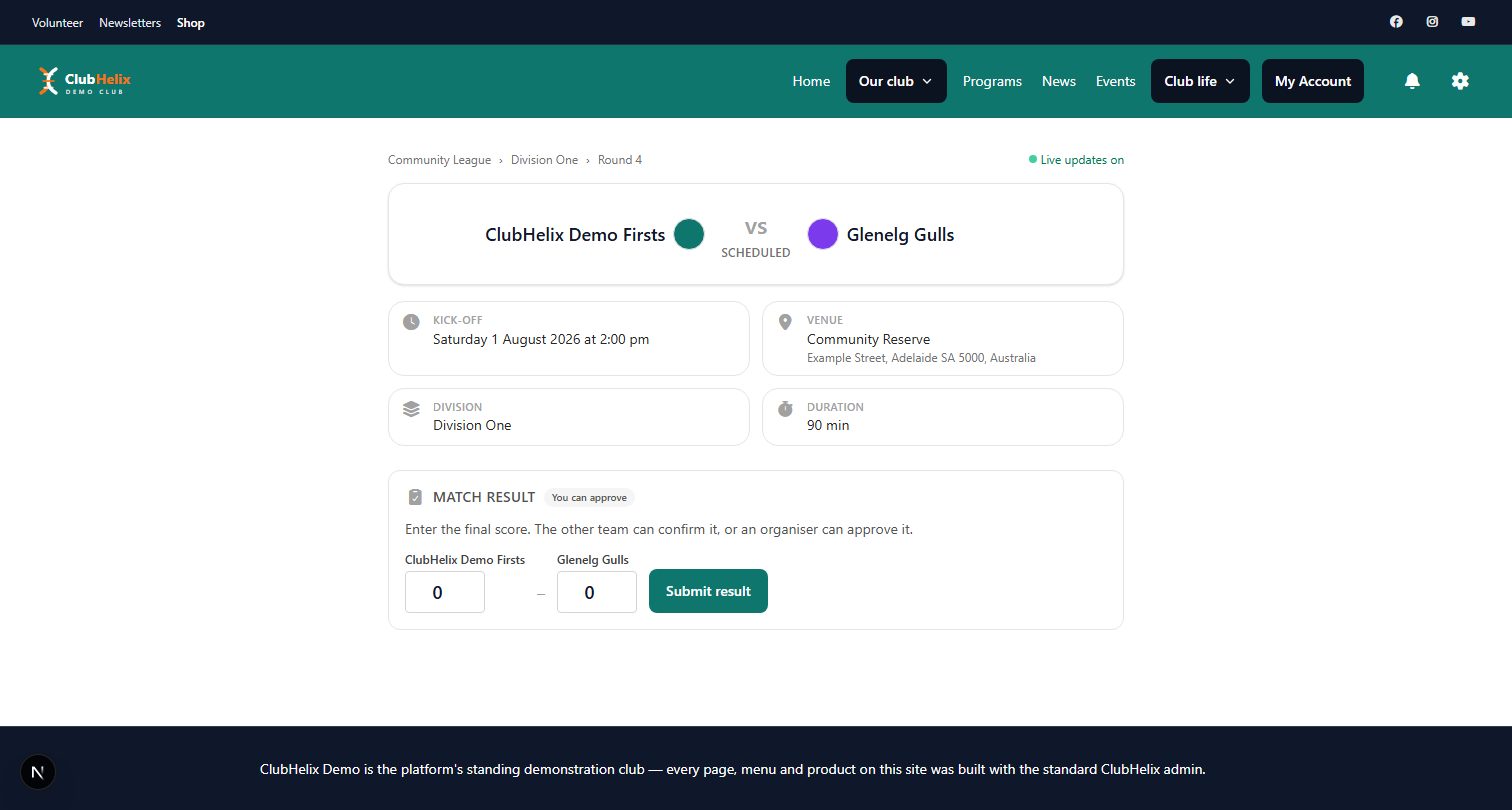
Put the stream on YOUR website
The most common streaming mistake isn't technical — it's strategic. Clubs post a bare platform link into a social feed, the game happens, the algorithm swallows it, and next week nobody remembers where streams live.
Instead, make your club website the home ground:
- Create a permanent "Watch live" destination — a match centre page members can bookmark, where this week's stream always appears. Consistency builds the habit; "the stream is on the club site" becomes club knowledge. (If you're still building the site itself, start with our club website guide.)
- Embed, don't link. An embedded player keeps viewers on your site — surrounded by your sponsors, your shop, your sign-up forms — instead of donating your audience to a feed of distractions.
- Promote the same way every week. An email/post the day before with the one link, kick-off time, and who's playing.
- Harvest highlights. Trim 3–5 clips from every replay for socials and the news page. Sixty seconds of a junior's first goal gets shared by every relative they have — it's the best recruitment advertising a club can produce, and it's free.
Game-day run sheet
- T-45 min: rig up (height, landscape, framing checked through the actual stream preview, not the camera screen), power bank connected, mic wind-shielded and tested with headphones
- T-30: start a private/unlisted test stream for 2 minutes; check picture, audio and data
- T-15: go live with a holding frame or warm-up shots; post/send the link; commentary mic check
- Kick-off: scorebug running, score updated every change
- Half-time: battery and data check; a word from the sponsor on commentary
- Full-time: don't kill the feed on the siren — capture the handshakes and the celebrations; end with the final score on screen
- After: title the replay properly ("Round 12 vs Harbour City — Seniors, 14 July"), clip highlights, update the match centre with the result, and log any issues for next week
Frequently asked questions
What's the cheapest livestream setup for a club?
A phone on a tripod, shot landscape from somewhere high near halfway, with a power bank cabled in and a pre-game test stream — realistically just a tripod and a power bank beyond the phone. The first paid upgrades should be a taller tripod and a wind-protected microphone, not a camera: at club level, height, stability and audio decide watchability, and glass decides almost nothing.
How much internet data does livestreaming a match use?
Streaming at 720p uses very roughly 1–1.5 GB of upload per hour, so a full match with warm-up runs 2–4 GB; 1080p can double that. Check your upload speed at the venue at game time (you want a steady 5+ Mbps for comfortable 720p), stream on a plan with real headroom, and drop the resolution rather than gamble on a flaky connection — a stable 480p beats a stuttering 1080p every single time.
Do we need permission to livestream junior sport?
Treat it as yes, three times over: your association or league's streaming rules, the venue's filming policy, and — most importantly — media consent from families, best collected as part of online registration. Announce streaming before games, accommodate opt-outs, favour wide game coverage over close-ups of individual children, and follow your sport's member-protection guidelines. All of it is straightforward when sorted pre-season.
How do we put the livestream on our club website?
Stream to a platform that provides an embed code (the major ones all do), then embed that player in a permanent "watch live" or match centre page on your site, so the location never changes week to week. A live match centre that pairs the embedded stream with live scores, and your news page for the replay and highlights afterwards, turns streaming from a scattered social link into a club asset that grows your own audience.
Give your streams a home ground: the ClubHelix live match centre puts live scores and your embedded stream on your own club website, with news and match reports to follow up. Streaming a big event? Pair this with our sports carnival guide.

