
What this guide answers
- Can our club just keep using a free Gmail address?
You can, and plenty do — but you're accepting real costs: handover pain when the owner leaves, official history locked in a personal account, weaker credibility with sponsors and councils, and growing deliverability…
- What does a club email address cost?
The domain is a small annual fee. On top of that: free, if you use forwarding aliases to volunteers' inboxes; a modest per-mailbox monthly fee if you want real hosted inboxes with club-owned history.
- What is DKIM in simple terms, and do we really need it?
DKIM is a digital signature your sending service puts on every email, matched against a public key in your domain's DNS, proving the mail genuinely came from an authorised sender.
- Should addresses be role-based or personal?
Role-based, always: secretary@, treasurer@, info@. The address belongs to the position, so handover means repointing one rule rather than re-educating every contact the club has.
UK edition. This guide is written for volunteer-run clubs in the UK. Where rules differ — grants, tax, incorporation, safeguarding — follow the UK-specific pointers below or check with your national body.
Somewhere in your club's history, a secretary set up northsidetigers2011@gmail.com, and the club has been paying for it ever since — in lost passwords, in emails going to members from three different personal addresses, in sponsors squinting at a proposal sent from someone's private account, and in the annual scramble when the role changes hands and nobody can remember who has the login.
A club email address at your own domain — secretary@yourclub.org — fixes all of it for a trivial cost, and the setup is genuinely a one-evening job. This guide covers what to set up, the options at each price point, and the small amount of technical plumbing (SPF and DKIM, explained in plain language) that keeps your club's email out of spam folders.
Why "@yourclub.org" matters more than it looks
Four concrete wins, in rough order of value:
- Handover becomes trivial.
secretary@yourclub.orgbelongs to the role, not the person. When the AGM elects a new secretary, you repoint one address. Members, the league, the council and the bank never need to update their contacts again. Compare that with the alternative: years of official correspondence marooned in a former volunteer's personal inbox. - Credibility. Sponsors, grant assessors and councils take
president@yourclub.orgmore seriously than a personal address. It signals an organised club — the same effect as a proper website, which is why the two usually get set up together (see how to build a sports club website). - Deliverability. Bulk email sent "from" a personal Gmail address via a newsletter tool is exactly the pattern modern spam filters distrust. Your own domain, correctly authenticated, is the foundation of email that reliably arrives — more on this below.
- Institutional memory. The inbox history stays with the club. The 2023 grant correspondence is still there when the 2027 committee needs it.
Step one: own a domain
Club email lives on a domain, so the club needs one — registered in the club's name, paid from the club's account, never through a volunteer's personal account.
For most clubs that means yourclub.org.uk or yourclub.co.uk, registered through any accredited registrar for a small annual fee. The .org.uk ending signals a community organisation, which suits a club nicely — but there's no wrong answer as long as the club, not a volunteer, holds the registration.
The same domain then serves double duty: your website lives at www.yourclub.org (connect it via your platform's custom domain support) and your email addresses live after the @. One domain, one renewal, whole digital identity.
Step two: choose role-based addresses
Create addresses for roles, not people. A sensible starter set for most clubs:
| Address | Used for |
|---|---|
secretary@ | Official correspondence, league and association contact |
president@ | Sponsors, council, external relations |
treasurer@ | Invoices, bank, payment queries |
registrar@ or membership@ | Joining questions, registration support |
info@ | The public catch-all on your website and socials |
media@ | Social accounts, photo submissions, newsletter replies |
Rules of thumb: keep the list short (six roles beats sixteen); never create firstname@ addresses for committee members (that recreates the personal-account problem with extra steps); and give every address at least one active human owner — a role address nobody reads is worse than none.
Step three: pick how the addresses work
There are three tiers, and the right one depends on budget and how much history you want to keep:
Option A — Email forwarding (free or nearly free). Each role address simply forwards to the current holder's personal inbox. Most registrars and DNS hosts include this free with the domain. Pros: nearly free, five-minute setup, handover is editing one forwarding rule. Cons: replies come from the volunteer's personal address (which looks inconsistent and leaks personal contacts), and the club keeps no central email history. Fine for a brand-new club; most outgrow it within a season or two.
Option B — Hosted mailboxes (a modest monthly fee per mailbox). Real inboxes at your domain through a business email provider (Google Workspace, Microsoft 365, or cheaper independent hosts). Pros: proper send-and-receive from the role address, shared archives, calendars, drive storage; history stays with the club forever. Cons: per-mailbox cost adds up, so most clubs buy two or three real mailboxes (secretary, treasurer) and use free forwarding aliases for the rest.
Worth knowing: Google and Microsoft both run discounted or donated plans for registered charities — a club with charitable status may qualify, so check before paying full price.
Option C — Shared inbox on a club platform. Some club platforms handle the outbound side for you — newsletters, receipts and notifications sent from your domain — while inbound role addresses forward per Option A. This is the sweet spot for clubs whose main email volume is member communication rather than one-to-one correspondence.
Most clubs land on a hybrid: one or two paid mailboxes for the heavy-correspondence roles, forwarding aliases for the rest, and the club platform sending bulk email from the same domain.
Step four: the deliverability plumbing (plain-language DKIM and SPF)
Here's the part most guides skip, and it matters more every year. Mail providers no longer accept "from" addresses on faith — they check whether the sending server is authorised to use your domain. Three DNS records do that job. You don't need to understand the cryptography; you do need to know what each one is for:
- SPF is the guest list. A DNS record listing which services are allowed to send email as
@yourclub.org— your mailbox provider, your club platform. Mail from anywhere else gets treated with suspicion. - DKIM is the wax seal. Your sending service signs each message; the public key sits in your DNS so receivers can verify the message really came from an authorised sender and wasn't altered in transit.
- DMARC is the instruction card. It tells receiving servers what to do with mail that fails the first two checks (let it through, quarantine it, or reject it), and sends you reports. Since 2024, Gmail and other major providers effectively require SPF/DKIM alignment and a DMARC record for anyone sending bulk email — this stopped being optional.
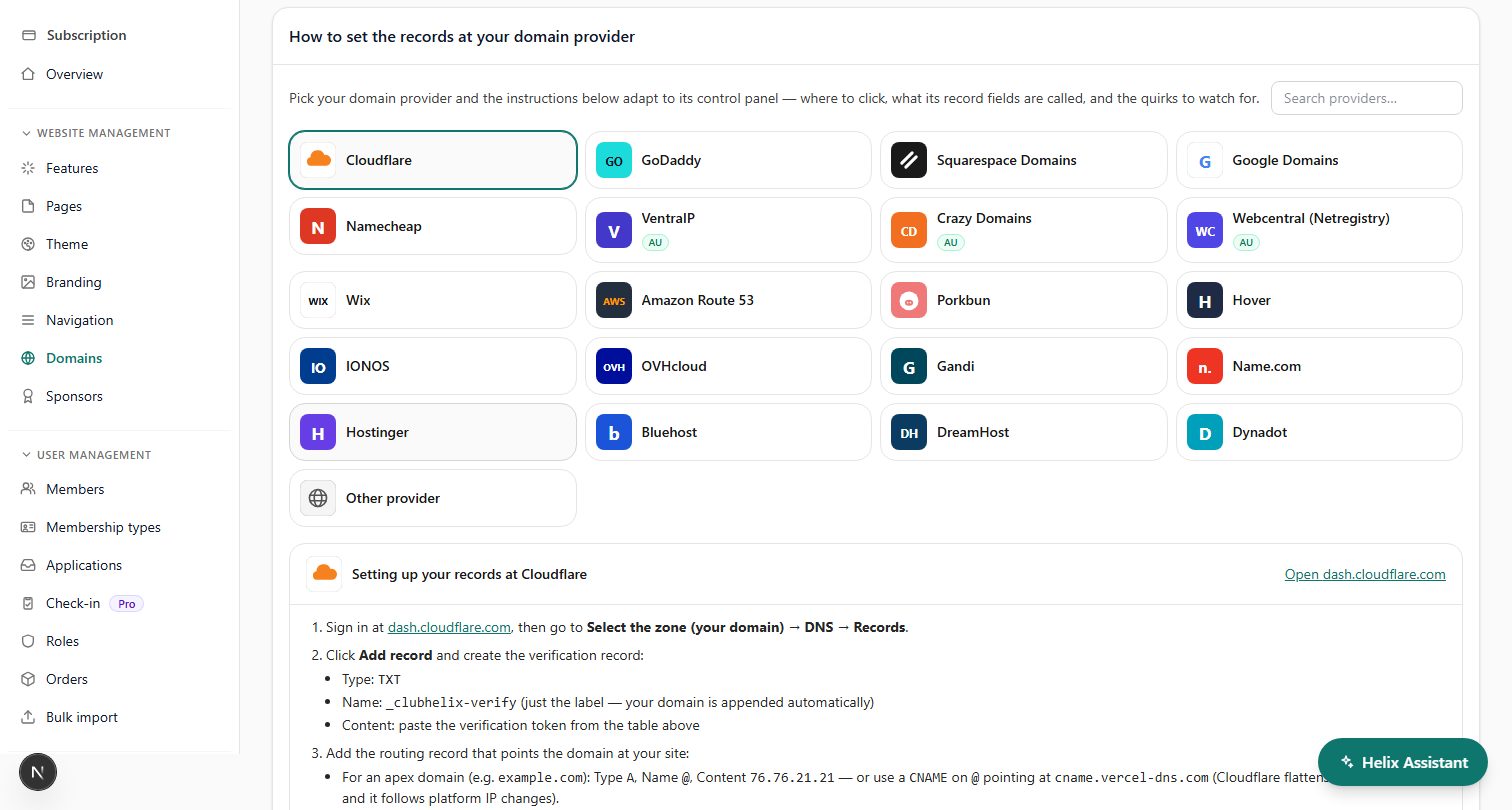
The practical upshot: whenever a service sends email on your club's behalf, it will give you two or three DNS records to add. Your mailbox provider gives you a set; your club platform gives you a set. Add them at wherever your domain's DNS is managed, and each takes effect within the hour. ClubHelix's custom sending domain setup walks you through exactly these records with copy-paste values and verifies them for you, so club broadcasts, receipts and notifications all go out authenticated from your own domain.
If your club email is currently landing in spam folders, missing or misconfigured authentication is the most common cause — we've written a full plain-language diagnosis in why club emails go to spam.

Step five: institutionalise it
The setup only pays off if it survives handovers. Four habits:
- Document the stack. One page in the handover pack: where the domain is registered, where DNS is managed, where mailboxes are hosted, who the billing contact is, what each DNS record is for. Future committees will bless you.
- Two admins, always. The email admin console, like the domain account, has at least two current committee members with access. Review at every AGM.
- Repoint on handover day. Changing forwarding/mailbox access is an agenda item at the first committee meeting after the AGM, alongside bank signatories.
- Retire the old addresses gracefully. Keep the legacy Gmail alive for a season with an auto-reply pointing to the new address, then let it go.
What it all costs
Realistic annual budget for a typical club:
- Domain: a small annual renewal fee
- Forwarding-only setup: usually free on top of the domain
- Two hosted mailboxes + aliases: a modest monthly fee per mailbox (less with a not-for-profit or charity discount, sometimes free)
- Club platform sending from your domain: usually included in the plan — see pricing
Set against one recovered volunteer-hour a month and the first sponsor who takes the club more seriously, it's among the best value line items in the club budget.
Frequently asked questions
Can our club just keep using a free Gmail address?
You can, and plenty do — but you're accepting real costs: handover pain when the owner leaves, official history locked in a personal account, weaker credibility with sponsors and councils, and growing deliverability problems as mail providers tighten bulk-sending rules around authenticated domains. A domain plus forwarding is one of the cheapest line items in the club budget; the upgrade pays for itself the first time the committee changes.
What does a club email address cost?
The domain is a small annual fee. On top of that: free, if you use forwarding aliases to volunteers' inboxes; a modest per-mailbox monthly fee if you want real hosted inboxes with club-owned history.
Registered not-for-profits often qualify for discounted or donated business email plans, so check eligibility before paying retail. Most clubs run one or two paid mailboxes plus free aliases.
What is DKIM in simple terms, and do we really need it?
DKIM is a digital signature your sending service puts on every email, matched against a public key in your domain's DNS, proving the mail genuinely came from an authorised sender. Together with SPF (the list of services allowed to send as your domain), it's how mail providers decide you're legitimate. Since Gmail and others tightened bulk-sender rules, yes — you really need it for any club that emails its member list.
Should addresses be role-based or personal?
Role-based, always: secretary@, treasurer@, info@. The address belongs to the position, so handover means repointing one rule rather than re-educating every contact the club has. Never create personal addresses at the club domain for committee members — it recreates the exact problem you're solving.
ClubHelix connects your own domain to your club website and sends every broadcast, receipt and notification from your own authenticated sending address — DNS records provided, verified, and monitored for you.

