
What this guide answers
- Should a club email go to everyone by default?
Start from "everyone with a membership" for anything constitutional or club-wide — AGM notices, fee deadlines, season dates — and narrow deliberately from there for everything else.
- Can we email parents instead of junior members?
Yes, and you should. For under-age members the address held on the record should be the parent or guardian's, and consent is theirs to give.
- Who on the committee should be able to send club-wide email?
Admins can send. You can also grant the broadcasts permission to a moderator or a specific helper — a communications officer, say — without making them an admin of everything else.
- Do we still need a newsletter if we are sending broadcasts?
They do different jobs. Broadcasts carry the things with a deadline; the newsletter carries the story of the season — results, milestones, the thank-yous that keep volunteers and sponsors around.
- What if most of our members have not opted in?
That is common for clubs migrating from a spreadsheet, and it is fixable rather than fatal.
Ask a committee how it tells members something important and you will usually get three answers in the same breath: a post on the club's social page, a message in a team chat, and "I think the secretary emails people". All three are happening, none of them is addressed to the whole membership, and the one that could be is generally the one nobody has set up properly.
Club email has a reputation for being fiddly, and some of that is earned. But the actual work is smaller than it looks: get the list right once, learn which audience filters to use, and build a habit around a handful of sensible defaults. This guide walks through the whole job from a committee's point of view — the list, the audience, the message, the subject line, the test send, the schedule, and the allowance you are spending each time you press send.
Your member list is worth more than your follower count
A social page is rented ground. You do not own the audience, you cannot see who was shown a post, and the people following you include former members, rival clubs, three bots and somebody's aunt. A post about Saturday's ground closure is addressed to whoever the feed decides to show it to.
A member list is different in kind. Every address on it belongs to somebody who filled in a form, paid a fee, or drove a child to training on a wet Tuesday. That is a relationship, and it is the one asset a committee genuinely owns. When you write to that list you are writing to named people who chose to be there, in a channel where a message can be long enough to actually explain something, can carry a form link and a payment link, and stays findable months later when somebody searches their mail for "AGM".
None of that makes email magic, and it does not make a social page useless — the two do different jobs, which club newsletters versus social media updates covers in more detail. It does mean that if your committee is only going to set up one channel properly this season, email is the one with the longest shelf life.
Start with the list, not the message
The single biggest improvement most clubs make to their email is to stop keeping a list at all.
That sounds contrary, so here is what it means in practice. Most clubs end up with an exported spreadsheet somewhere — members_final_v3.csv — which somebody pastes into a separate email marketing tool. From the instant it is exported it starts rotting. People join and are not in it. People resign and stay in it. Somebody fixes a typo in the member record and the spreadsheet keeps the typo. Six months later nobody is sure which file is current, and the treasurer is emailing fee reminders to three people who left last winter.
The alternative is to let your member database be the list. When a send is addressed to your live roster, a new registration is included automatically, a resignation drops out automatically, and a corrected address is corrected everywhere at once. That is the structural reason clubs move their email inside the platform that already holds their members rather than maintaining the same list in two places.
Before your first proper send, spend an hour on the roster itself:
- One address per person, not per household. Two parents sharing one address is fine and normal. A single address standing in for a whole family means only one of them can ever unsubscribe, and the other two will never see anything.
- Decide how juniors are handled. For under-age members, the address on the record should be the parent or guardian's. Write that rule down so the next registrar follows it.
- Check your roles and positions are current. Audience filters are only as good as the data behind them. If last year's treasurer still holds the position, next month's committee email goes to the wrong person.
- Tidy the obvious rubbish. Duplicated records,
noemail@, addresses typed with a space in them, the one that is just.— clear these before they become bounces.
Choosing who the message goes to
Once the roster is clean, the audience controls do the heavy lifting. A broadcast gives you four ways to narrow the recipient list, and they stack:
- Roles — limit to Members, Moderators or Admins. Leave every box unchecked and the message goes to everyone with a membership.
- Positions — address only the holders of chosen council positions, which is how you write to the committee without writing to the club.
- Only members with an active paid membership — restricts the send to people who are currently paid up.
- Only members who opted in to club emails — on by default, and covered properly in club email consent and opt-in.
A live recipient count sits beside these while you work, and it is the most useful number on the page. Treat it as a sanity check before every send. If you expect around 180 people and the count says 12, you have either stacked a filter you did not mean to or you have a consent gap — either way, you have found it before pressing send rather than afterwards.
Three worked examples, because the filters are easy to get exactly backwards:
- A fee reminder goes to everyone with a membership with the paid-membership filter off. The people you most need to write to are precisely the ones who have not paid; switching that filter on writes only to the members who already did.
- An AGM notice goes to everyone with a membership, with no role filter at all. Your constitution almost certainly requires notice to all members, so this is the one send where narrowing the audience is a governance problem, not a tidiness decision.
- A "can somebody open up on Sunday" message goes to a position filter, not the club. Fifteen people who can act on it will read it properly; four hundred people who cannot will learn that your emails are not for them.
That last point is the real discipline. Every email that is not relevant to a reader costs you a little of their attention on the next one.
Club-wide email, team message, or newsletter?
Three different jobs, three different tools.
A broadcast is a one-off with a deadline or a decision in it. Fees are due Friday. The ground is closed. Nominations for the committee close on the 14th. It is short, it has one ask, and it stops being useful the moment the date passes.
A team-level message belongs with the team. Fixture changes, a wet-weather call for one side, a reminder about shin pads — these go to the twenty people affected. Sending them to the whole club is the fastest way to train four hundred members to ignore your mail.
A newsletter is the regular round-up: results, a president's note, a sponsor thank-you, photos from the gala day. It is designed rather than plain, it can be published to your website as an archive, and it runs on a rhythm — monthly in season is a sensible default. If you are not sure what goes in one, how to write a club newsletter has a structure you can reuse.
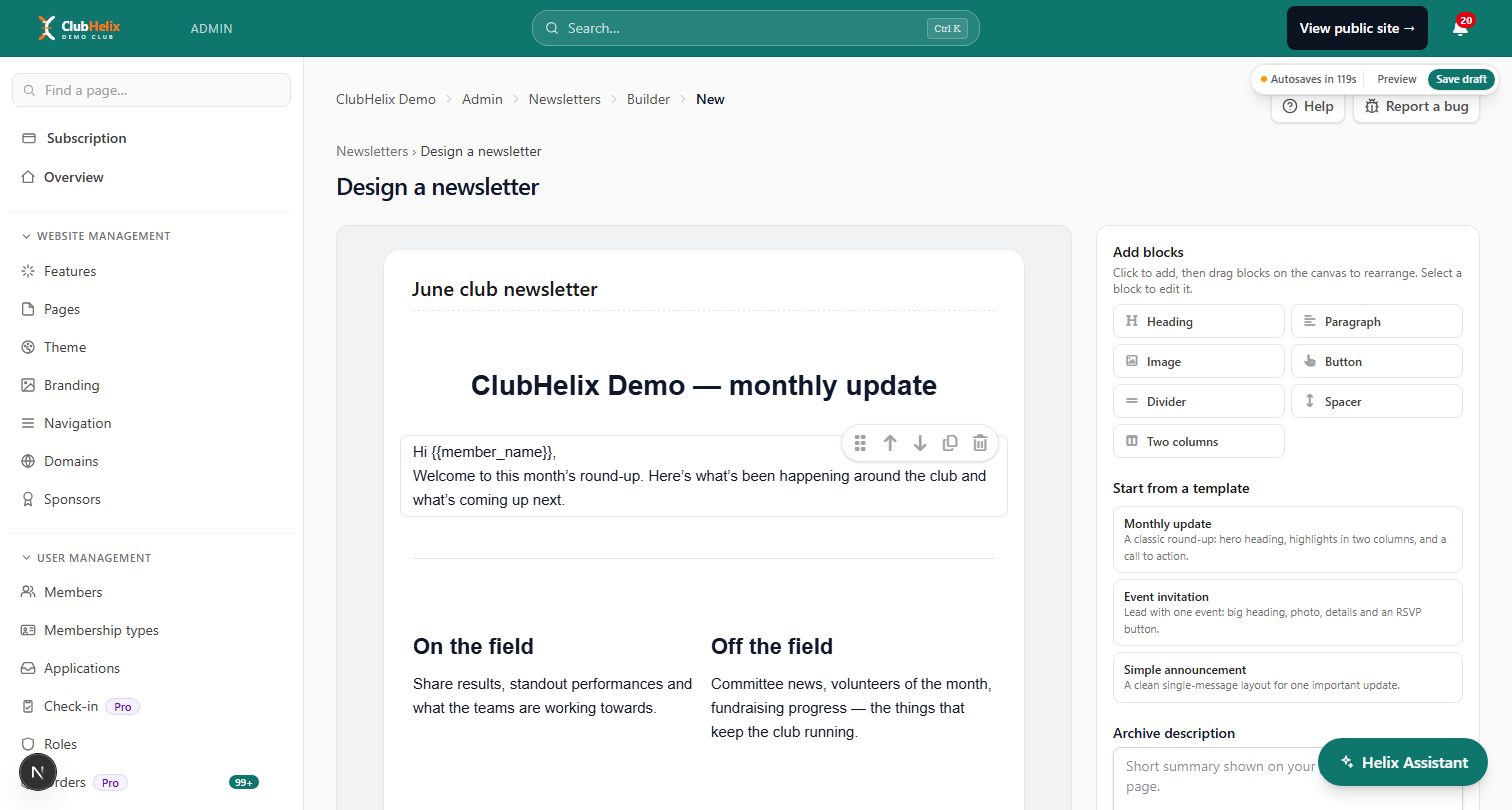
A rough frequency guide for a volunteer-run club: one club-wide email a fortnight in season, a newsletter monthly, and team messages as often as the team needs. Anything more than that and you are competing with yourself for attention.
Write the subject line last
Write the message, work out what you actually want people to do, then write the subject.
- Say the thing. "Fees due Friday 27 March" beats "Important club update" every time. The reader should be able to act without opening it.
- Put the date in. Deadlines belong in the subject, not the third paragraph.
- Keep the useful part first. A phone shows roughly the first forty to fifty characters. Front-load them.
- One subject, one ask. If the email genuinely contains two unrelated things, it is two emails — or it is a newsletter.
- Skip the shouting. Capitals and exclamation marks make a message look like the sort of mail people bin without reading.

Then read the first two sentences of the body. A reader who is skimming on a phone between meetings sees the subject, the sender name and about that much. If the ask is not in there, it is buried.
Merge tokens, and the branding you only set up once
You can drop {{member_name}} and {{tenant_name}} anywhere in a subject or body, and they are filled in per person as the message is composed for each recipient. Used once near the top, a first name makes a club email read like it came from a human. Used five times it reads like a mail-merge from an insurance company, so use it sparingly and check how it looks for a record with an unusual or missing name.
Separately, save your email branding once: a reusable intro, sign-off and footer that wrap around every message, with any field left blank simply omitted. This is where the club's contact details, the reply-to expectation ("replies to this email go to the secretary") and your standard sign-off belong. Writing them once means nobody has to remember them at 10pm the night before a deadline, and every send looks like it came from the same organisation.
For an even more consistent look, a verified custom sending domain lets club email carry your own domain rather than the platform address. That is worth doing for recognition as much as anything else — why club emails go to spam explains what authentication does and why mail providers care about it.
Preview, test, then schedule
Three habits, all cheap:
- Read the full preview. It shows your saved intro, sign-off and footer wrapped around the body, which is the thing a member actually sees — not the bare text you just typed.
- Send a test to yourself. The test goes to your own address with the message exactly as composed, so you can check merge tokens, links, images and how the whole thing looks on a phone. Do this before every send that matters, and open it on a phone, because that is where most of your club reads.
- Get a second pair of eyes on anything about money, the AGM or a child. Save it as a draft, ask another committee member to read it, then send. Drafts sit at the top of the broadcasts hub and can be edited or deleted until you use them.
Scheduling is the last decision. You can send now or pick a date and time, which is how you write the fee reminder on Sunday afternoon and have it go out on Tuesday evening when people are actually looking at their mail. Two things to know: the recipient list is locked in when you schedule, so anyone who joins between now and then is not on it — schedule close to the send rather than three weeks out — and once a broadcast has been sent or scheduled it cannot be edited or sent again. A scheduled or in-progress broadcast can still be cancelled.
The email allowance is one pool
Your plan includes an email allowance for each billing cycle, shown as a meter at the top of the broadcasts hub. It resets on your renewal date, or at the start of each calendar month if the club has no paid subscription. The important part is that it is shared across all club email, not just the ones you write by hand. Every registration confirmation, receipt, booking notification and password reset comes out of the same pool.
Practically, that means budgeting rather than rationing. A 300-member club sending one club-wide email a fortnight is spending roughly 600 messages every four weeks before a single receipt goes out, so glance at the meter before a big send, and narrow an audience rather than sending the same thing to everybody twice. If your club genuinely outgrows its allowance, that is a plan question — see pricing for what each tier includes.
Broadcasts and transactional email are not the same thing
It is worth understanding the difference, because the rules treat them differently.
A broadcast is something you decided to send, to a group you chose. It carries an unsubscribe link in the footer automatically, it is governed by consent, and a member who opts out stops being included.
Transactional email is sent by the system to one person as a direct result of something they did: a payment receipt, a registration confirmation, a booking reminder, a password reset. Those templates live under System → Email, where an admin or moderator can edit the wording and send themselves a test. Somebody who has opted out of club-wide email still gets their receipt, because a receipt is not marketing — see transactional email for how the two stay separate.
The one rule that matters: do not smuggle promotion into a transactional message. A registration confirmation with three paragraphs about the sponsors' night at the bottom is a broadcast wearing a disguise, and it undermines exactly the separation that keeps receipts flowing to people who have opted out of everything else.
A rhythm your next committee can inherit
- Before the season. Tidy the roster, confirm positions, set the email branding, and check who on the committee holds the permission to send.
- Fortnightly in season. One club-wide message with one ask. Draft it, preview it, test it, schedule it.
- Monthly. The newsletter, published to the website as well so it has a permanent home.
- After each send. Look at the broadcast's status. If some individual sends did not complete, the hub offers a resend for those; if an address keeps failing, fix the record rather than trying again.
- Once a year. Re-confirm consent, clear out the records of people who left, and write down what you did so the next secretary does not start from scratch.
None of this requires a communications officer. It requires somebody to do it the same way twice, which is a much lower bar and the actual difference between clubs whose members know what is going on and clubs whose members do not.
Frequently asked questions
Should a club email go to everyone by default?
Start from "everyone with a membership" for anything constitutional or club-wide — AGM notices, fee deadlines, season dates — and narrow deliberately from there for everything else. The filters exist so that a message about the committee's next meeting goes to the committee. A useful test: if a reader cannot do anything with the email, they should probably not be on the recipient list.
Can we email parents instead of junior members?
Yes, and you should. For under-age members the address held on the record should be the parent or guardian's, and consent is theirs to give. Make that the registrar's standing rule so it survives a change of volunteer, and make sure your registration form asks for the guardian's address explicitly rather than hoping somebody works it out.
Who on the committee should be able to send club-wide email?
Admins can send. You can also grant the broadcasts permission to a moderator or a specific helper — a communications officer, say — without making them an admin of everything else. Two people is the right number: one to write and one who can cover an absence. One person is a single point of failure, and five people is how a club ends up sending the same reminder three times.
Do we still need a newsletter if we are sending broadcasts?
They do different jobs. Broadcasts carry the things with a deadline; the newsletter carries the story of the season — results, milestones, the thank-yous that keep volunteers and sponsors around. A club that only ever sends deadlines becomes a club whose email is only ever bad news. Publishing the newsletter to your site as well, alongside your news posts, gives it a second life for prospective members who find it later.
What if most of our members have not opted in?
That is common for clubs migrating from a spreadsheet, and it is fixable rather than fatal. Add the opt-in question to your registration form so every new member answers it, point existing members at their own account page, and run a short re-consent campaign explaining what the club sends and how often. The mechanics are in club email consent and opt-in.
ClubHelix gives your club broadcasts addressed to the live member roster, receipts and confirmations kept properly separate, and your own verified sending domain — all from the same admin as your members and payments. Start a club site and set it up once.


